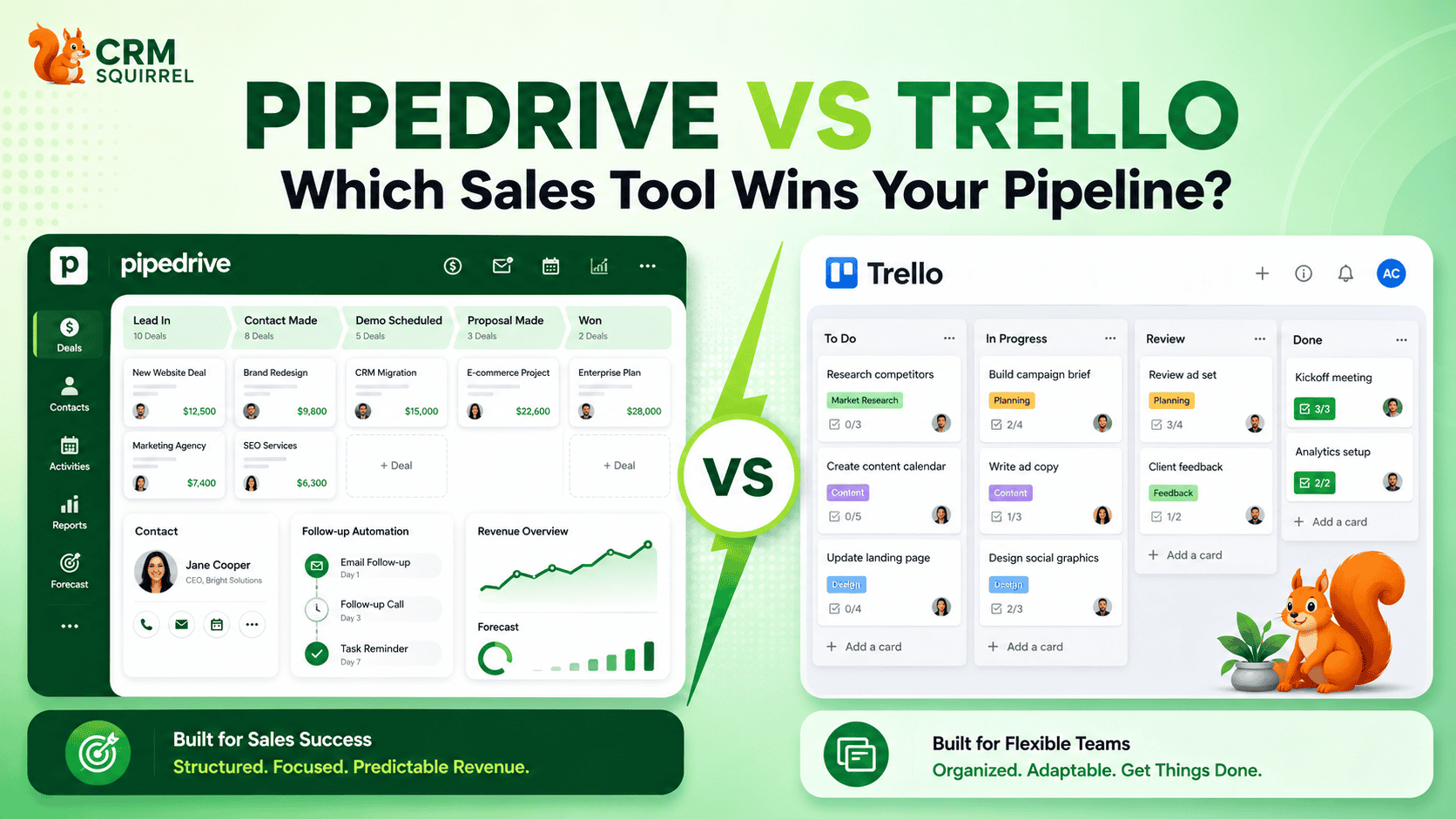
Pipedrive and Trello can both display work through visual, stage-based boards. However, only one of them is built specifically to manage leads, deals, contacts, sales activities, communication history, forecasts and revenue performance.
Pipedrive is a dedicated sales CRM. Trello is a flexible work and project management platform that can be adapted into a basic sales board.
For a freelancer or small team managing a limited number of enquiries, Trello may be enough at the beginning. For a business that depends on consistent follow-ups, customer records, pipeline reporting and revenue forecasting, Pipedrive is the more complete solution.
The short verdict is straightforward:
- Pipedrive wins for structured sales pipeline management.
- Trello wins for flexible task and project management.
- Using Pipedrive and Trello together can be effective when sales and project delivery need separate workflows.
This detailed Pipedrive vs Trello comparison explains the differences so that you can select the platform that fits your sales process, team size and growth plans.
Want to test Pipedrive with your real sales process? Start CRM Squirrel’s exclusive 45-day Pipedrive free trial and explore its pipelines, automation, reporting and integrations before making a long-term commitment.
Pipedrive vs Trello: The Quick Answer
The better platform depends on whether you are primarily managing revenue opportunities or completing tasks. Although both tools use visual workflows, their underlying structures are designed for different purposes.
Choose Pipedrive if your business needs to manage:
- Leads and opportunities
- People and organizations
- Deal values
- Sales stages
- Calls, meetings and follow-ups
- Email communication
- Sales automation
- Conversion rates
- Revenue forecasts
- Individual and team performance
Choose Trello if your team primarily needs to manage:
- Tasks
- Projects
- Checklists
- Content production
- Internal requests
- Campaign workflows
- Client onboarding
- Product roadmaps
- Creative collaboration
- General work management
Trello can imitate the appearance of a sales pipeline. Pipedrive provides both the visual pipeline and the structured CRM system behind it.
What Is the Main Difference Between Pipedrive and Trello?
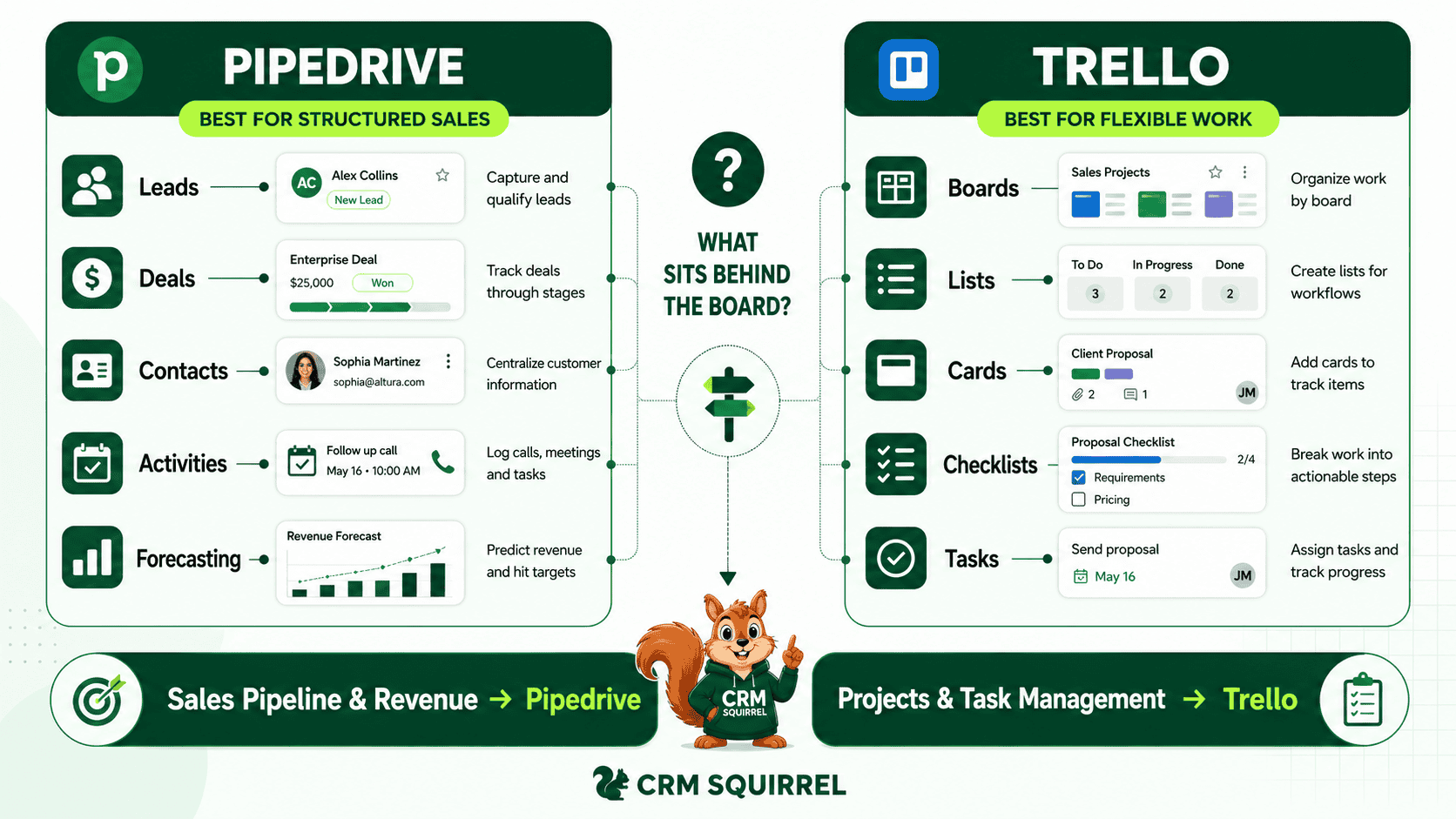
The main difference between Pipedrive and Trello is the purpose for which each platform was designed. This difference affects how information is stored, how workflows are automated and what managers can measure.
Pipedrive is a sales CRM built around leads, deals, people, organizations and sales activities. It is designed to help businesses manage customer relationships and move revenue opportunities through a repeatable sales process.
Trello is a visual work management platform built around boards, lists and cards. It is designed to help teams organize tasks, projects and collaborative workflows.
In Pipedrive, a deal is a structured sales record. It can contain a value, owner, expected closing date, contact, organization, products, emails, activities and winning probability.
In Trello, a card is a flexible work item. A card can represent a lead, customer, task, article, support request or project. The user must decide what each card means and how the information inside it should be organized.
This flexibility makes Trello useful for many workflows. However, it also means Trello does not naturally understand sales relationships in the same way as a dedicated CRM.
What Is Pipedrive?
Pipedrive is a customer relationship management platform created to help sales teams organize opportunities, schedule activities and close more deals. Its interface centres on a visual pipeline where deals move through defined sales stages.
Pipedrive combines this visual pipeline with structured records for customers, companies, activities and revenue. This gives salespeople a connected view of the commercial relationship instead of a collection of isolated tasks.
A Pipedrive account can be used to manage:
- Leads that have not yet become active deals
- Active sales opportunities
- People and their contact information
- Companies and organizations
- Calls, meetings and follow-up activities
- Emails and communication history
- Products and services
- Deal values and expected closing dates
- Multiple sales pipelines
- Custom Fields and business-specific data
- Sales reports and revenue forecasts
- Automations and integrations
Businesses new to the platform can read our complete guide to Pipedrive for small businesses to understand how it supports growing sales teams.
What Is Pipedrive Best For?
Pipedrive is best for businesses where sales opportunities must be followed through a defined process. It is particularly useful when several people interact with the same prospects or when management requires reliable information about pipeline performance.
Common Pipedrive users include:
- B2B sales teams
- Marketing and digital agencies
- Consultants
- Professional service providers
- SaaS companies
- Real estate agencies
- Contractors
- Recruitment firms
- Manufacturers
- Legal practices
- Financial service providers
- Companies with recurring sales or renewals
The platform is most valuable when missed activities, incomplete customer records or inaccurate forecasts can directly affect revenue.
What Is Trello?
Trello is a visual work management platform that organizes information through boards, lists and cards. A board normally represents a project or workflow, while lists represent stages and cards represent individual tasks or records.
For example, a business can create a Trello sales board containing the following lists:
- New Leads
- Contacted
- Qualified
- Meeting Scheduled
- Proposal Sent
- Negotiation
- Won
- Lost
Each lead can then be created as a card and moved through the lists. Members, labels, due dates, checklists, comments and attachments can be added to each card.
Trello also provides features such as:
- Board templates
- Card assignments
- Start dates and due dates
- Advanced checklists
- Custom Fields on eligible plans
- Built-in automation
- Multiple work views
- Power-Ups
- Application integrations
- Mobile apps
- Workspace permissions
This structure is easy to understand and can be adapted to many different types of work.
What Is Trello Best For?
Trello is best for workflows where the primary objective is to complete and coordinate tasks. Its flexibility allows teams to create simple processes without first configuring a complete CRM data structure.
Trello is commonly used for:
- Project management
- Marketing calendars
- Content production
- Website development
- Client onboarding
- Product roadmaps
- Recruitment workflows
- Internal task management
- Event planning
- Creative production
- Support request tracking
- Remote team collaboration
A small business can use Trello for basic lead tracking, but sales pipeline management is not its primary purpose.
Pipedrive vs Trello for Sales Pipeline Management
Visual pipeline management is the main area where Pipedrive and Trello appear similar. Both platforms allow users to move items between stages, but the information and functionality behind those items are different.
A pipeline should do more than show where an opportunity is located. It should help the team understand who the customer is, how much the opportunity is worth, what has already happened and what must happen next.
Managing a Sales Pipeline in Trello
A Trello sales pipeline usually consists of one board with lists representing the stages of the sales process. Each prospect or opportunity is created as a card.
This structure may work when:
- One or two people handle sales
- The business receives a limited number of enquiries
- The sales cycle is short
- Deal values are simple
- Customer communication is stored elsewhere
- Management does not require detailed sales reports
- Sales forecasting is not essential
The board provides a quick overview of active opportunities. However, the team must decide how names, contact details, deal values, sources and follow-up dates will be entered.
As more people use the board, inconsistent data can become a problem. One user may place a telephone number in the description, another may use a Custom Field and someone else may leave it in a comment. That inconsistency makes automation and reporting more difficult.
Managing a Sales Pipeline in Pipedrive
Pipedrive provides a visual deal board supported by structured CRM records. Each deal can be connected to a person, organization, owner, value, expected closing date, activity history and communication timeline.
Businesses can create different pipelines for different revenue processes, including:
- New business
- Renewals
- Partnerships
- Recruitment
- Property sales
- Wholesale opportunities
- High-value enterprise deals
- Product implementation
- Repeat customers
Pipedrive stages can be configured to represent real milestones in the sales process. Salespeople can therefore understand what each stage means and what must occur before a deal moves forward.
Pipedrive wins this category because it manages the complete opportunity, not only its position on a visual board.
Businesses that need help defining their pipelines can use CRM Squirrel’s Pipedrive setup services to configure stages, fields, permissions, automations and reports correctly.
Lead, Contact and Company Management
Effective customer relationship management requires more than saving a name and telephone number. A business needs to understand how contacts, companies, opportunities, activities and communication relate to one another.
This connected information is an important difference between Pipedrive and Trello.
Contact Management in Trello
Trello does not provide a native CRM database of people and organizations comparable to Pipedrive. Contact information can be saved inside cards, but the business must determine how it will be organized.
Teams may store customer information in:
- Card descriptions
- Custom Fields
- Comments
- Checklists
- Labels
- Attachments
- Connected applications
This approach may be manageable for a small number of leads. It becomes more difficult when one customer is related to several opportunities or when several contacts work for the same company.
Information can also become fragmented across multiple cards and boards. A salesperson may need to search through descriptions, comments and attachments to reconstruct the customer’s history.
Contact Management in Pipedrive
Pipedrive separates and connects people, organizations, leads, deals and activities. This structure allows the team to maintain a complete view of each commercial relationship.
A person can be connected to an organization and multiple deals. The record can show contact details, notes, activities, emails and previous opportunities.
This provides several practical benefits:
- Customer information remains centralized
- Duplicate records are easier to identify
- Salespeople can review previous communication
- Multiple contacts can be associated with one company
- Past and active opportunities remain connected
- Team members can understand the relationship before contacting the customer
Pipedrive is therefore the stronger platform for lead, contact and company management.
Email and Communication Tracking
Sales are rarely completed through pipeline stages alone. Prospects ask questions, attend meetings, request proposals and exchange multiple emails before making a decision.
A useful sales platform should preserve this communication history and connect it to the appropriate customer and opportunity.
Communication Management in Trello
Trello can create cards from incoming emails and can connect with communication tools through Power-Ups and integrations. This is helpful when an email needs to become a task.
However, converting an email into a card is different from maintaining a complete CRM communication timeline. If a prospect exchanges several emails with different team members, the business needs a reliable way to connect those messages with the correct contact, company and deal.
Creating that structure in Trello may require additional applications, manual updates and strict internal processes.
Communication Management in Pipedrive
Pipedrive supports CRM email management on eligible plans. Its official email integration features can connect conversations with relevant contacts and deals.
Depending on the selected plan and configuration, Pipedrive can provide:
- Email synchronization
- Email tracking
- Link tracking
- Email templates
- Group email
- Automated emails
- Sales sequences
- Smart Bcc
- Communication timelines
- Email-based follow-up workflows
A salesperson can open a deal and review communication without searching across personal inboxes and separate project cards.
Pipedrive wins this category because communication is treated as part of the customer relationship rather than only as another task.
Sales Activities and Follow-Up Management
A pipeline is useful only when every active opportunity has a clear next step. Sales teams lose deals when calls, meetings, proposals and follow-ups are not scheduled or completed on time.
Both platforms can create reminders, but Pipedrive manages follow-ups within a dedicated sales activity system.
Follow-Up Management in Trello
Trello allows users to assign members, set due dates, create checklists and add reminders. A salesperson can place a follow-up date on a lead card or create a checklist of qualification steps.
Trello automation can also help the team identify overdue cards or move cards when specific conditions are met.
This is suitable for straightforward task management. However, the follow-up remains part of a general card rather than a structured activity connected to a customer, company and revenue opportunity.
Follow-Up Management in Pipedrive
Pipedrive allows users to schedule different types of sales activities and connect them to deals, people and organizations.
Common activities include:
- Calls
- Meetings
- Tasks
- Emails
- Deadlines
- Product demonstrations
- Proposal reviews
- Custom activity types
Salespeople can review upcoming, overdue and completed activities across their pipelines. Managers can also examine whether representatives are completing the actions required to move deals forward.
This supports activity-based selling. Instead of only asking where a deal is located, the team can identify the next action needed to progress it.
Pipedrive wins this category because follow-up management is integrated into the complete sales workflow.
Pipedrive vs Trello Automation
Automation can reduce repetitive work and improve process consistency. Both Pipedrive and Trello offer automation, but they are designed to automate different types of events.
Trello primarily automates card and board activity. Pipedrive primarily automates customer, deal and sales activity.
Automation in Trello
Trello automation can respond to actions taken on cards, lists, boards and due dates. Users can create rules, scheduled commands and card or board buttons.
A Trello automation might:
- Move a card after a checklist is completed
- Assign a member when a card enters a list
- Apply a label when a due date approaches
- Create recurring cards
- Copy a card to another board
- Add a checklist from a template
- Send a notification when conditions are met
These automations are useful for projects, content production and internal workflows. Automation limits vary according to the selected Trello plan.
Automation in Pipedrive
Pipedrive automation responds to sales and CRM events. A workflow can begin when a lead, person, organization, activity or deal is created or updated.
Pipedrive’s official automation documentation explains how triggers, conditions, delays and actions can be combined to create multi-step workflows.
A Pipedrive automation might:
- Assign an inbound lead to a sales representative
- Schedule an activity when a deal enters a stage
- Send an email after a discovery meeting
- Notify a manager about a high-value opportunity
- Update a deal when specific conditions are met
- Create a renewal reminder before a contract expires
- Start onboarding when a deal is won
- Send data to another business application
- Create a Trello card for the delivery team
Trello is excellent for automating tasks. Pipedrive is the stronger choice for automating a sales process.
Reporting, Sales KPIs and Revenue Forecasting
A visual board can show where opportunities are located, but managers also need to know whether the sales process is working. Reliable reporting helps the business identify bottlenecks, forecast revenue and improve team performance.
This is one of the areas where the difference between a project board and a dedicated CRM becomes especially clear.
Reporting in Trello
Trello provides additional views and dashboard features on eligible plans. These views can help teams analyze card distribution, deadlines, workload and project progress.
However, Trello does not automatically understand that a card represents a revenue opportunity. Creating meaningful sales reports may require:
- Consistent Custom Fields
- Strict card templates
- External spreadsheets
- Reporting Power-Ups
- Integration platforms
- Manual calculations
- Business intelligence tools
A Trello dashboard can support workflow reporting, but it is not automatically a sales performance dashboard.
Reporting in Pipedrive
Pipedrive’s Insights and Reports are designed to analyze sales activity and revenue performance.
Depending on the plan, businesses can report on:
- Deal conversion rates
- Won and lost deals
- Deal values
- Revenue forecasts
- Average sales cycles
- Pipeline performance
- Lead performance
- Sales activities
- Individual results
- Team performance
- Product sales
- Custom data
- Sales goals
For example, a manager may discover that many opportunities reach the proposal stage but few reach negotiation. That information can lead to improved proposal quality, better pricing communication or faster follow-up.
Pipedrive wins this category because reporting is built around sales outcomes and revenue.
Customization and Workflow Flexibility
Both Pipedrive and Trello can be customized, but each platform offers a different type of flexibility. Trello provides broad workflow freedom, while Pipedrive provides deeper sales-process customization.
The better option depends on whether the business needs an open workspace or a structured CRM.
Trello’s Flexible Work Management
Trello begins with a largely open board. Users decide what the board, lists, cards, labels and Custom Fields represent.
A Trello board can manage:
- A sales pipeline
- A content calendar
- A recruitment process
- A website project
- Customer onboarding
- Product development
- Support requests
- Event planning
This makes Trello highly flexible for teams managing different types of work.
Pipedrive’s Sales Customization
Pipedrive allows businesses to customize the sales environment without removing the underlying CRM structure.
Customization options include:
- Multiple pipelines
- Custom sales stages
- Custom Fields
- Deal and lead labels
- Custom activity types
- User permissions
- Visibility groups
- Filters
- Automations
- Reports
- Integrations
Trello wins for general workflow flexibility. Pipedrive wins when the business needs to customize a structured sales process.
Collaboration and Project Management
Closing a deal and delivering the work are two different processes. The sales team manages the commercial relationship, while the delivery team manages tasks, timelines and project responsibilities.
Trello is especially effective once a sale becomes a project with multiple deliverables.
Project Collaboration in Trello
Trello cards can include task assignments, due dates, checklists, comments, files and dependencies. This gives operational teams a clear way to coordinate delivery.
A won sale might become:
- A website development project
- A client onboarding plan
- A marketing campaign
- A software implementation
- A training schedule
- A property transaction checklist
- A consulting engagement
Trello is usually more flexible for detailed task and project coordination.
Project Collaboration in Pipedrive
Pipedrive focuses primarily on sales and customer relationships, although project functionality may be available depending on the selected product and plan.
It can help manage post-sale activities, customer communication and project-related information. However, teams with complex delivery requirements may prefer to connect Pipedrive with a dedicated project management platform.
Trello wins for general project collaboration, while Pipedrive remains stronger for managing the customer and commercial relationship.
Pipedrive vs Trello Integrations
Integrations allow both platforms to exchange information with the other applications used by a business. The quality of the integration strategy can significantly affect productivity and data accuracy.
Pipedrive offers a marketplace, API, webhooks and automation options. Trello extends its functionality through Power-Ups and third-party integrations.
Pipedrive is commonly connected with:
- Google Workspace
- Microsoft Outlook
- Slack
- Microsoft Teams
- QuickBooks
- Xero
- Stripe
- Calendly
- PandaDoc
- Zapier
- Make
- Trello
- Marketing platforms
- Customer support tools
- Accounting systems
Businesses with advanced requirements can read our Pipedrive API integration guide to understand how custom data connections can reduce manual work.
Can Pipedrive and Trello Work Together?
Pipedrive and Trello can work together when the sales and delivery teams need different platforms. This approach allows each system to perform the job for which it is best suited.
Pipedrive’s official Trello integration can connect deals, people and organizations to Trello cards. It can also automatically create Trello cards based on Pipedrive events.
A combined workflow could operate as follows:
- A new enquiry enters Pipedrive.
- A salesperson qualifies the lead.
- Calls, emails and meetings are recorded in Pipedrive.
- The opportunity moves through the sales pipeline.
- The deal is marked as won.
- A Trello card is automatically created.
- The delivery team manages onboarding and project tasks in Trello.
- Pipedrive remains the source of truth for customer and revenue data.
In this arrangement, Pipedrive manages the relationship and revenue, while Trello manages the work required to deliver the result.
Ease of Use and Team Adoption
Ease of use should be evaluated over the complete life of the system, not only during the first few minutes. A platform that is simple to start may become difficult to manage when the volume of information grows.
Trello is usually faster to understand initially, while Pipedrive provides more long-term structure.
Getting Started With Trello
Trello’s board, list and card system is easy to recognize. A small team can create a board and begin adding opportunities almost immediately.
This low learning curve is valuable when the workflow is simple. However, the team must create its own rules for data entry, stage definitions, customer records and reporting.
Getting Started With Pipedrive
Pipedrive requires more initial configuration because the business must decide how its sales process should be represented.
Initial decisions may include:
- Pipeline stages
- Lead and deal fields
- Contact structure
- Activity types
- Deal ownership
- Lead sources
- User permissions
- Automations
- Reports
- Data imports
This setup creates the structure required for reliable sales management. A well-configured Pipedrive account can ultimately be easier to operate because users know where information belongs and what action should happen next.
CRM Squirrel’s expert CRM consulting can help businesses design a system that matches their actual sales process and improves user adoption.
Pipedrive vs Trello Pricing
Pricing is an important part of the decision, but subscription cost should be compared with functionality, implementation requirements and the value of sales opportunities.
Trello is generally less expensive because it is a general work management platform rather than a complete sales CRM.
Trello Pricing
Trello offers Free, Standard, Premium and Enterprise plans. Each level increases the available boards, automation limits, views, storage and administration features.
As of July 2026, the official Trello pricing page lists the following annual-billing prices:
- Free: $0 for up to 10 collaborators per Workspace
- Standard: $5 per user per month
- Premium: $10 per user per month
- Enterprise: starting at $17.50 per user per month
The Free plan may be enough for individuals or very small teams managing simple workflows.
Pipedrive Pricing
Pipedrive offers several plans with progressively more advanced CRM, automation, reporting and sales management features.
As of July 2026, Pipedrive’s official pricing page lists annual-billing prices beginning at:
- Lite: $14 per seat per month
- Growth: $39 per seat per month
- Premium: $59 per seat per month
- Ultimate: $79 per seat per month
Plan names, prices and included features may change. Businesses should confirm current information before subscribing.
Our detailed Pipedrive pricing guide can help you compare the available options and avoid paying for features your team does not need.
Which Platform Offers Better Value?
The platform with the lowest subscription price does not always offer the best business value. The correct comparison should include the cost of missed follow-ups, manual data entry, unreliable reports and lost sales opportunities.
Trello may provide better value when the business only needs a lightweight visual workflow. Pipedrive may provide better value when sales efficiency and conversion performance directly affect revenue.
A cheaper system becomes expensive when employees spend hours maintaining it or opportunities are lost because important customer information is incomplete.
Try Pipedrive Free for 45 Days
Reading a comparison can help narrow your options, but the best way to evaluate a CRM is to test it with your own pipeline, sales stages and customer data.
CRM Squirrel provides an exclusive 45-day Pipedrive free trial, giving businesses more time to explore the platform than the standard trial period.
The extended trial allows your team to evaluate:
- Customizable sales pipelines
- Deal and contact management
- Workflow automation
- Sales activities
- Email integration
- Reporting and dashboards
- Revenue forecasting
- Application integrations
- Mobile sales management
CRM Squirrel also provides expert guidance, a discovery call and complimentary automation support to help you evaluate Pipedrive in a practical sales environment.
Start Your Exclusive 45-Day Pipedrive Trial
Data Quality, Permissions and Scalability
A sales system must remain reliable as the number of leads, users and customer interactions increases. What works for 20 active opportunities may not work for 2,000 records across several departments.
Structured data, permissions and consistent processes become increasingly important as the business grows.
Scaling a Trello Sales Board
A Trello sales board may become difficult to maintain when the volume of cards and users increases. The business may need to create additional rules and external reporting processes.
Common scaling challenges can include:
- Duplicate lead cards
- Inconsistent customer names
- Missing contact information
- Conflicting labels
- Fragmented customer history
- Difficult cross-board reporting
- Manual revenue calculations
- Weak sales forecasting
- Limited visibility into salesperson performance
These problems do not mean Trello is poorly designed. They appear because a general work board is being asked to function as a complete CRM.
Scaling With Pipedrive
Pipedrive uses structured CRM records and provides tools for managing users, permissions, visibility and data consistency.
Pipedrive’s official permissions and visibility guidance explains how businesses can control which users can view or modify different information.
A structured CRM can help a growing company:
- Standardize data entry
- Control access to sensitive records
- Assign clear deal ownership
- Separate sales pipelines
- Automate repetitive processes
- Create consistent reports
- Forecast revenue
- Monitor individual and team performance
Pipedrive is the stronger option for a business expecting its sales operation to grow.
When Should You Choose Trello?
Trello is the better choice when the workflow is primarily task-based and the business does not require advanced customer relationship management.
It may be the right platform when:
- You need a simple visual board
- One person handles most enquiries
- Sales volume is low
- The sales cycle is short
- Customer records are stored elsewhere
- Revenue forecasting is unnecessary
- Project delivery is more important than sales reporting
- You need an inexpensive starting point
- Your team already uses Trello
- You are testing a basic sales process
Trello is an excellent work management platform. Problems usually arise only when a growing business expects it to provide the complete functionality of a dedicated CRM.
When Should You Choose Pipedrive?
Pipedrive is the better choice when sales is a structured and repeatable business process. It becomes particularly valuable when several people handle leads or management needs accurate pipeline information.
Pipedrive is likely the right choice when:
- Multiple people handle leads
- Deals have measurable values
- Customer history must remain centralized
- Follow-ups directly affect revenue
- Emails need to be associated with deals
- Management requires conversion reports
- Revenue forecasting is important
- The business needs multiple pipelines
- Sales representatives need clear daily priorities
- Automation is required
- The CRM must connect with other applications
- The sales operation is expected to grow
Businesses comparing Pipedrive with other CRM platforms can also read why Pipedrive is better than many other CRMs.
Can Trello Replace a CRM?
Trello can replace a CRM only when the business has extremely basic customer and sales requirements. Creating lists called “Qualified” and “Proposal Sent” produces a visual pipeline, but it does not automatically create a complete customer relationship management system.
A dedicated sales CRM should normally help manage:
- Leads
- Contacts
- Companies
- Deals
- Sales activities
- Communication history
- Deal ownership
- Conversion reporting
- Revenue forecasting
- Workflow automation
- User permissions
- Pipeline performance
It is possible to recreate portions of this functionality in Trello using Custom Fields, Power-Ups, automation and external reporting tools. However, the cost and complexity of rebuilding CRM functionality may eventually outweigh the convenience of using a simple board.
If the team is repeatedly requesting more fields, reports, reminders, integrations and controls, it may be time to move from Trello to a dedicated CRM.
How to Move From Trello to Pipedrive
Moving from Trello to Pipedrive should begin with process design and data cleaning. Importing cards without planning can transfer existing inconsistencies into the new CRM.
A structured migration helps ensure that contacts, companies, deals, stages and sales activities remain accurate.
Step 1: Audit Your Trello Boards
The first step is to identify which boards, lists and cards contain useful sales information. Old, duplicate and irrelevant records should be identified before migration.
The audit should review:
- Active sales boards
- Pipeline lists
- Customer cards
- Contact details
- Deal values
- Assigned users
- Labels
- Due dates
- Attachments
- Duplicate cards
- Lost or inactive opportunities
This provides a clear picture of the information that must be transferred.
Step 2: Design the Pipedrive Structure
The next step is to determine how Trello data will map into Pipedrive. A card should not automatically become a deal without considering what it represents.
The migration plan should define:
- Which cards become leads
- Which cards become deals
- Which details become people
- Which details become organizations
- How Trello lists map to sales stages
- How labels map to Custom Fields
- How card members map to deal owners
- How deal values and dates will be imported
This mapping helps preserve relationships between the imported records.
Step 3: Clean and Standardize the Data
Data should be cleaned before it enters Pipedrive. Importing inconsistent information can undermine reporting and automation from the beginning.
Cleaning may include:
- Removing duplicates
- Standardizing company names
- Correcting email addresses
- Formatting telephone numbers
- Confirming deal values
- Removing outdated opportunities
- Standardizing lead sources
- Assigning record owners
Clean data provides a stronger foundation for the CRM.
Step 4: Build the Sales Pipeline
The Pipedrive pipeline should represent real sales milestones rather than vague internal descriptions.
Useful stages might include:
- New Enquiry
- Initial Contact Completed
- Discovery Scheduled
- Qualified Opportunity
- Proposal Sent
- Decision Pending
- Contract Sent
- Won
- Lost
Each stage should have a clear meaning and entry requirement. This prevents salespeople from interpreting the pipeline differently.
Step 5: Test a Small Import
A small sample should be imported before transferring all Trello data. This allows the team to verify that fields, contacts, organizations, deals, stages and owners are mapped correctly.
Any problem discovered during the test can be corrected before it affects the complete database.
Step 6: Create Essential Automations
The first automations should solve clear business problems rather than automate every available action.
High-value examples include:
- Assigning new leads
- Scheduling follow-up activities
- Sending proposal reminders
- Notifying managers about stalled deals
- Creating renewal reminders
- Starting onboarding after a deal is won
- Creating Trello cards for project delivery
Additional automation can be added once the core workflow is working reliably.
Step 7: Train the Team
CRM adoption depends on users understanding how and why the system should be used. Training should cover both platform features and internal sales rules.
Team members should understand:
- Where customer information belongs
- Who owns each deal
- When a stage should change
- Which activities must be scheduled
- Which fields are mandatory
- How lost reasons should be recorded
- Which reports management will review
CRM Squirrel can assist with pipeline design, data migration, automation, integration and training through its Pipedrive consulting services.
Final Verdict: Pipedrive vs Trello
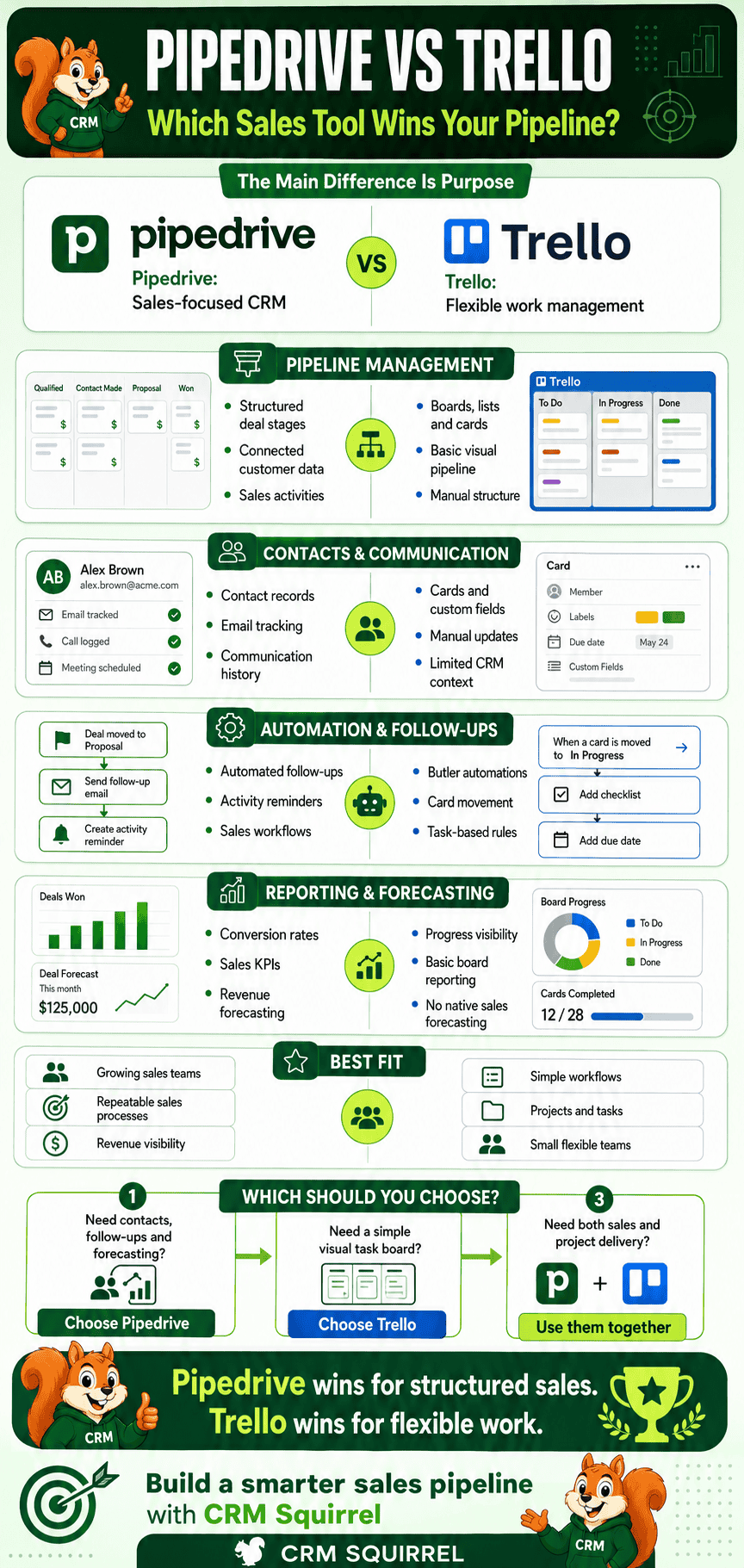
Pipedrive wins when the goal is to manage a serious sales pipeline. It provides structured customer records, communication tracking, sales activities, workflow automation, reporting and revenue forecasting.
Trello wins when the goal is flexible task and project management. It can support a lightweight sales board for a freelancer or small team, but its CRM limitations become more noticeable as lead volume and reporting requirements increase.
The final decision can be summarized as follows:
- Choose Trello for simple visual tasks and lightweight opportunity tracking.
- Choose Pipedrive for structured sales and customer relationship management.
- Use Pipedrive and Trello together when sales and project delivery require separate workflows.
The right platform is not necessarily the one with the lowest price or simplest board. It is the platform that helps your team protect opportunities, complete follow-ups, maintain reliable customer information and make better sales decisions.
Ready to Build a Better Sales Pipeline?
A CRM produces meaningful results when its pipelines, stages, fields, automations and reports match the way the business actually sells. Simply subscribing to Pipedrive is not enough without the correct setup and adoption plan.
CRM Squirrel can help you:
- Audit your existing Trello or CRM workflow
- Design a customized Pipedrive pipeline
- Clean and migrate customer data
- Configure Custom Fields and permissions
- Build sales automations
- Integrate Pipedrive with other applications
- Create actionable dashboards and reports
- Train your sales team
- Improve long-term CRM adoption
If you want to evaluate the platform first, start with CRM Squirrel’s exclusive 45-day Pipedrive free trial and test it with your actual leads, deals and sales process.
Start Your 45-Day Pipedrive Free Trial Today
You can also review CRM Squirrel’s Pipedrive service packages for professional setup, automation, integration and ongoing CRM support.
Frequently Asked Questions About Pipedrive vs Trello
The following frequently asked questions address the most common concerns businesses have when comparing Pipedrive and Trello. These answers are also written in a format suitable for FAQ schema implementation.
Is Pipedrive Better Than Trello for Sales?
Pipedrive is better than Trello for structured sales management. It provides dedicated features for leads, deals, contacts, activities, email communication, sales automation, reporting and revenue forecasting. Trello is better for general task and project management.
Can I Use Trello as a Sales CRM?
Trello can be used as a basic sales CRM by creating lists for pipeline stages and cards for leads. However, it does not offer the same native contact management, communication history, sales reporting and forecasting available in Pipedrive.
Is Trello Cheaper Than Pipedrive?
Trello is generally cheaper than Pipedrive and offers a useful free plan. However, businesses should compare functionality and operational value rather than subscription cost alone. A dedicated CRM may deliver better value when sales performance directly affects revenue.
Which Is Easier to Use, Pipedrive or Trello?
Trello is usually easier to start using because its board, list and card structure is simple. Pipedrive requires more initial configuration but provides a more organized environment for managing sales as the business grows.
Does Pipedrive Have Project Management Features?
Pipedrive focuses primarily on sales CRM and customer relationship management. Project-related functionality may be available depending on the selected products and plan. Trello remains more flexible for detailed task and project collaboration.
Does Trello Provide Sales Reports?
Trello offers dashboard and alternative work views on eligible plans. However, it does not provide the same native conversion analysis, sales activity reporting and revenue forecasting as Pipedrive.
Can Pipedrive Integrate With Trello?
Pipedrive can integrate with Trello. The integration can connect deals, contacts and organizations with Trello cards and automatically create cards when deals are created, moved to a specified stage or marked as won or lost.
Should a Startup Use Pipedrive or Trello?
A startup with a very small number of leads may begin with Trello. A startup with an active sales process, multiple representatives or a need for revenue forecasting should consider Pipedrive. Our guide to the best CRMs for startups provides additional options.
When Should I Move From Trello to Pipedrive?
You should consider moving when the team starts missing follow-ups, duplicating customer information, manually calculating forecasts or struggling to report on pipeline performance. These are signs that the sales process requires a dedicated CRM.
Can I Use Pipedrive for Sales and Trello for Project Delivery?
Pipedrive and Trello can be used together. Pipedrive can manage leads, deals, communication and customer relationships, while Trello manages the tasks required to onboard the customer and deliver the purchased product or service.
Does Pipedrive Offer a Free Trial?
Pipedrive offers a trial for new customers. CRM Squirrel provides access to an exclusive 45-day Pipedrive free trial with expert guidance, a discovery call and complimentary automation support.
Accuracy and Editorial Note
This comparison was reviewed using information from official Pipedrive and Trello product, pricing, integration and support resources. Product features, trial conditions and subscription prices may change, so readers should confirm the latest information before purchasing.


