The food industry runs on relationships, timing, repeat orders, and operational accuracy. Whether you sell to restaurants, retailers, wholesalers, distributors, hotels, or direct consumers, missed follow-ups and disconnected customer data can quickly turn into lost revenue.
A food-industry CRM helps your team manage leads, track buyers, organize sales opportunities, follow up on quotes, monitor repeat orders, and build stronger customer relationships. The right system can also help you identify your best customers, improve distributor communication, reduce manual admin, and create more predictable revenue.
This guide compares seven of the best CRM platforms for food businesses. It focuses on practical use cases for food manufacturers, FMCG brands, restaurants, catering companies, food distributors, wholesalers, and suppliers.
Why Food Businesses Need a CRM
Food businesses often manage a complicated mix of buyers, orders, product lines, pricing agreements, delivery schedules, distributors, and repeat customers. Many teams still rely heavily on spreadsheets, WhatsApp messages, paper notes, or individual salesperson knowledge.
That approach may work at a very small scale, but it becomes risky as customer volume grows. A CRM gives your business one shared place to manage customer data and sales activity.
A well-configured CRM can help food businesses:
- Track prospects from the first enquiry to a completed order.
- Record buyer preferences, product interest, and buying history.
- Follow up on wholesale quotes before they go cold.
- Manage distributor, retailer, restaurant, and supplier relationships.
- Segment customers by location, industry, order frequency, or value.
- Create reminders for contract renewals, price reviews, and reorders.
- Measure which channels, salespeople, and products generate revenue.
- Improve upselling and cross-selling opportunities.
The biggest ROI benefit is simple: your team spends less time searching for information and more time speaking with the right customers at the right time.
What Features Should a Food Industry CRM Include?
The best CRM for your food business depends on whether you sell B2B, B2C, wholesale, retail, or through distributors. However, a strong system should support both relationship management and a repeatable sales process.
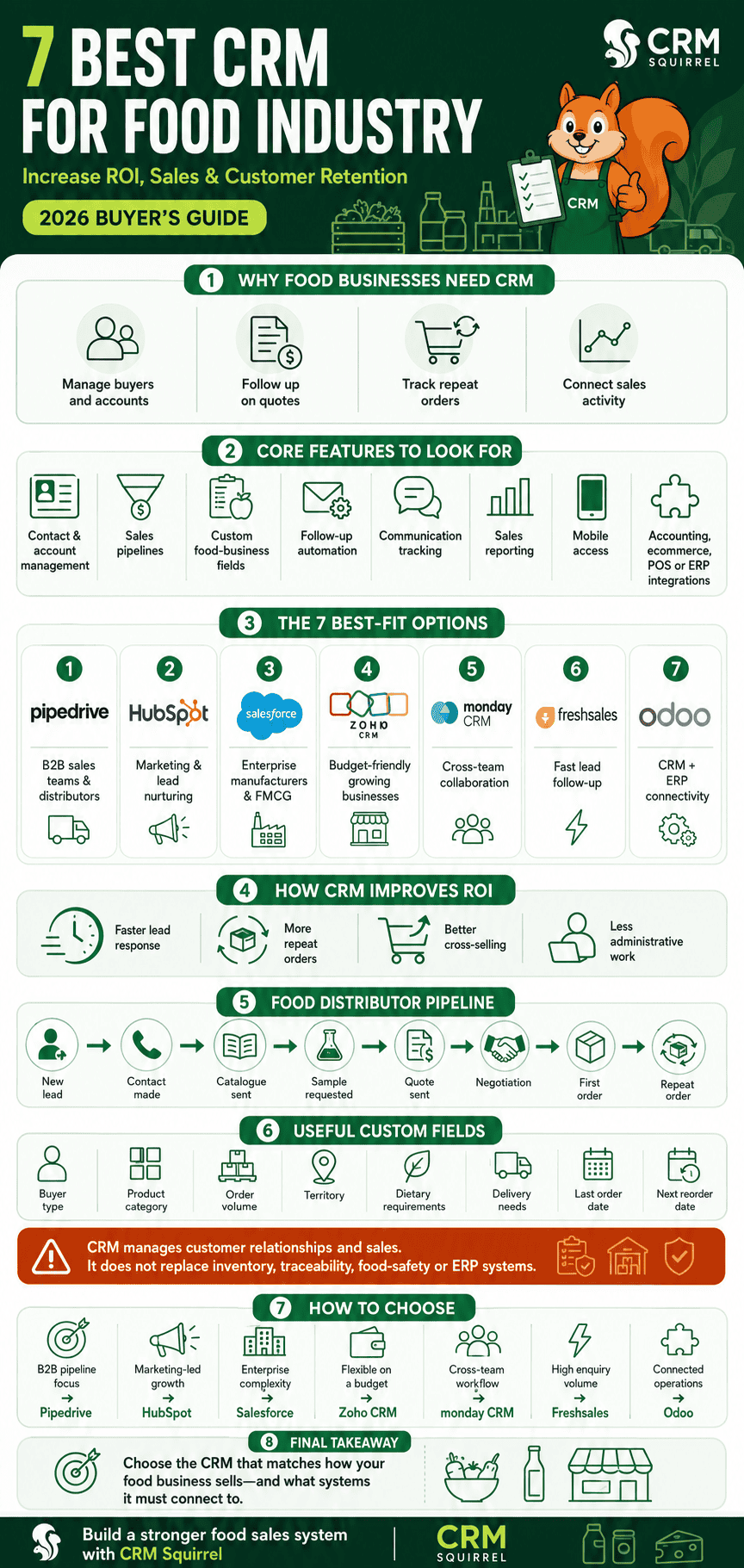
Look for these core features before choosing a CRM:
- Contact and account management for buyers, suppliers, outlets, and distributors.
- Sales pipeline management for enquiries, samples, quotes, negotiations, and orders.
- Custom fields for dietary requirements, territory, product category, order volume, or delivery needs.
- Follow-up reminders and task automation.
- Email, calling, and communication tracking.
- Reporting for sales value, win rate, repeat purchases, and sales performance.
- Mobile access for field sales representatives.
- Integrations with accounting, ecommerce, email marketing, POS, inventory, or ERP software.
- Permission controls for sales, customer service, operations, and management teams.
A CRM should not replace a full inventory, traceability, food-safety, or ERP system when your business needs those capabilities. Instead, it should connect the customer-facing sales process to those operational systems.
1. Pipedrive: Best CRM for Food Sales Teams and B2B Suppliers
Pipedrive is an excellent choice for food distributors, wholesalers, manufacturers, catering suppliers, and B2B food brands that need a clear sales pipeline without enterprise-level complexity.
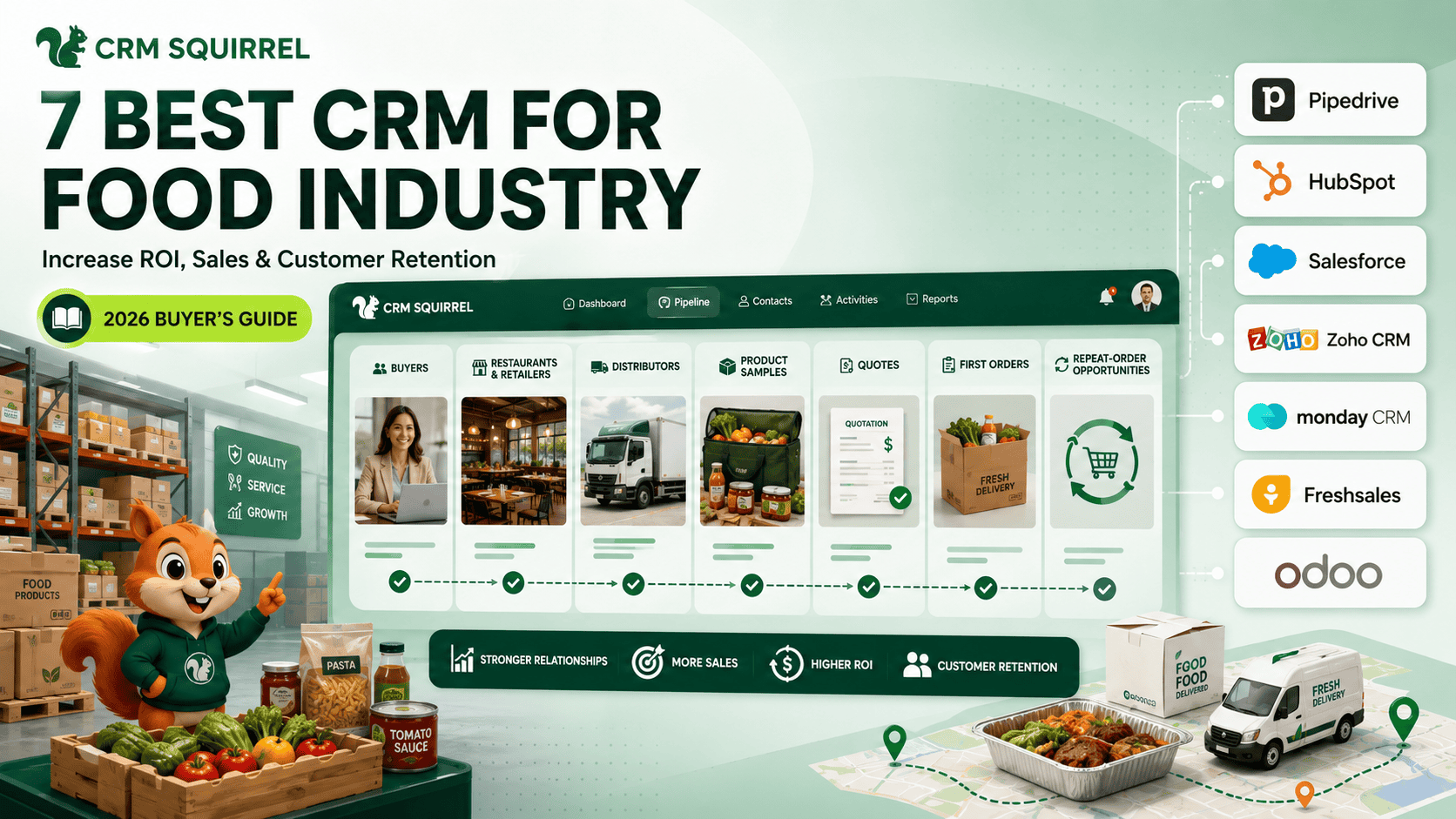
Its visual pipeline makes it easy to track each opportunity from first contact through sampling, quotation, negotiation, first order, and repeat business. Sales teams can see exactly which accounts need attention and what activity should happen next.
Why Pipedrive Works Well for Food Businesses
Pipedrive is especially useful when your team sells through relationships and repeat outreach. You can create separate pipelines for restaurants, retail buyers, distributors, corporate catering customers, or new product launches.
Useful Pipedrive features for food businesses include:
- Custom sales pipelines for different buyer types.
- Deal stages for enquiry, sample sent, quote sent, approved, first order, and repeat order.
- Custom fields for product category, order quantity, location, buyer type, and dietary requirements.
- Activity reminders for calls, tastings, meetings, and reorder follow-ups.
- Automated tasks when a quote is sent or a deal reaches a specific stage.
- Reporting dashboards for pipeline value, conversion rates, and salesperson performance.
- Mobile access for sales representatives visiting stores, restaurants, or distributors.
- Integrations with accounting, email marketing, ecommerce, and business tools.
Pipedrive states that it is used by more than 100,000 companies and offers sales pipeline management, reporting, automation, AI features, and a marketplace with hundreds of integrations.
Best Use Case for Pipedrive
Pipedrive is best for a food supplier or distributor with a small to mid-sized sales team that needs better follow-up discipline and sales visibility.
For example, a frozen-food distributor could create a pipeline with these stages:
- New restaurant or retailer lead
- Contact made
- Product catalogue sent
- Sample requested
- Quote sent
- Negotiation
- First order won
- Repeat-order opportunity
The sales manager can then see which buyers are waiting for samples, which quotes have not received a response, and which accounts have not reordered recently.
If you need help building this type of workflow, a Pipedrive consultant can configure custom pipelines, data fields, sales automations, and reporting around your real sales process.
2. HubSpot CRM: Best for Food Brands Focused on Marketing and Lead Nurturing
HubSpot CRM is a strong option for food brands that depend heavily on inbound marketing, ecommerce, content, email campaigns, and customer lifecycle communication.
It is particularly useful for direct-to-consumer food brands, subscription businesses, speciality food companies, meal-prep services, and businesses that generate leads from websites, social media, downloadable menus, or online forms.
Why HubSpot Works Well for Food Brands
HubSpot combines CRM, marketing, customer service, content, and sales tools in one ecosystem. That makes it useful when marketing and sales need to work from the same customer data.
Food businesses can use HubSpot to:
- Capture leads from recipe downloads, enquiries, and online forms.
- Segment buyers by product interest, location, customer type, or dietary preference.
- Send automated email sequences for first-time buyers.
- Nurture wholesale leads with product catalogues and case studies.
- Track website visits and marketing engagement.
- Create customer support tickets for order or service issues.
- Build landing pages for product launches and trade campaigns.
Best Use Case for HubSpot
HubSpot is best for a food brand that wants to connect lead generation with email marketing and customer relationship management.
For example, an organic snack brand could collect leads through a “Find a stockist” form and automatically send different emails to consumers, retail buyers, and distributors. The sales team can then focus on high-intent wholesale enquiries while the marketing team nurtures consumer leads.
HubSpot can become expensive as businesses add advanced marketing, automation, and reporting features, so it is important to review the total cost before committing.
3. Salesforce: Best CRM for Enterprise Food Manufacturers and FMCG Brands
Salesforce is a powerful enterprise CRM platform for large food manufacturers, consumer goods companies, international distributors, and businesses with complex sales, service, trade, and data requirements.
It is not usually the easiest or lowest-cost option, but it offers deep customization, large-scale reporting, advanced integrations, and broad ecosystem support.
Why Salesforce Works Well for Large Food Businesses
Salesforce is designed for organizations that need multiple departments to work from one connected customer-data environment. Its CRM ecosystem can support sales, marketing, customer service, ecommerce, analytics, and industry-specific processes.
Salesforce’s Consumer Goods offering focuses on connecting customer data, improving retail execution, and supporting more personalized customer engagement. Learn more about Salesforce Consumer Goods solutions.
Useful Salesforce use cases include:
- Managing national retail accounts and distributor networks.
- Tracking trade promotions and account-level agreements.
- Connecting field sales representatives with central sales teams.
- Integrating with ERP, inventory, finance, and ecommerce systems.
- Creating advanced territory and account-management workflows.
- Building detailed management reports across regions and product categories.
- Supporting customer service across several channels.
Best Use Case for Salesforce
Salesforce is best for a food manufacturer or FMCG business with complex operations, several sales teams, large account volumes, and the budget for an experienced implementation partner.
A company selling through supermarkets, wholesalers, restaurants, and ecommerce may need Salesforce when it requires strong data governance and detailed integrations across departments.
4. Zoho CRM: Best Budget-Friendly CRM for Growing Food Businesses
Zoho CRM is a practical choice for growing food businesses that want customization and automation without the higher cost often associated with enterprise CRMs.
It is a good option for small and mid-sized manufacturers, local distributors, food importers, catering companies, and wholesalers that need more flexibility than a basic contact-management tool.
Why Zoho CRM Works Well for Food Businesses
Zoho CRM allows businesses to customize modules, workflows, fields, reports, and dashboards. It also connects with a larger ecosystem of Zoho applications, which can be attractive for businesses looking to manage more than sales.
Food businesses can use Zoho CRM to:
- Track wholesale leads and customer accounts.
- Create territory-based sales processes.
- Set workflow rules for quote follow-ups.
- Manage product and customer data.
- Build custom reports for sales, customer activity, and deal progress.
- Connect CRM data with Zoho Books, Zoho Campaigns, Zoho Inventory, or other Zoho tools.
Best Use Case for Zoho CRM
Zoho CRM is best for a business that wants a flexible CRM and may later want connected accounting, inventory, marketing, or helpdesk tools from the same software family.
For example, a food-import business could track restaurant leads in Zoho CRM, manage product availability through connected tools, and automate reminders when a buyer has not placed a repeat order within a planned period.
5. monday CRM: Best for Collaborative Food Sales and Account Workflows
monday CRM is a strong option for food businesses that need collaboration between sales, operations, marketing, and customer service teams.
Its visual board-based structure can be easier for teams that already use monday.com for project management or internal workflows. It is particularly useful when customer opportunities involve several people and multiple handover steps.
Why monday CRM Works Well for Food Businesses
monday CRM allows teams to create custom boards, fields, automations, views, and dashboards. This gives food businesses flexibility to adapt the platform to a unique process.
Useful examples include:
- Tracking new retail account applications.
- Managing product-launch campaigns.
- Coordinating food-service proposals.
- Assigning tasks after a customer places a first order.
- Managing onboarding for new distributors.
- Tracking samples, approval status, and commercial documents.
- Connecting sales opportunities with delivery or account-management tasks.
Best Use Case for monday CRM
monday CRM is best for a food company where sales does not work alone. If every new customer requires coordination between sales, production, logistics, finance, and marketing, monday’s collaboration features can be valuable.
For example, when a hotel chain agrees to trial a new product range, the CRM board can trigger tasks for pricing approval, sample delivery, product documentation, onboarding, and account follow-up.
6. Freshsales: Best for Food Businesses That Need Fast Lead Follow-Up
Freshsales is a sales CRM from Freshworks that is well suited to teams that want communication, lead management, and sales activity tracking in one place.
It can be a good fit for food-service businesses, catering companies, franchise groups, meal-delivery services, and suppliers receiving frequent enquiries through calls, email, and web forms.
Why Freshsales Works Well for Food Businesses
Freshsales focuses on helping sales teams manage leads, conversations, deals, and follow-up actions. Its communication-focused approach can be helpful when speed matters.
Food businesses can use Freshsales to:
- Capture and assign new leads quickly.
- Track calls, emails, meetings, and follow-up activity.
- Score leads based on engagement or fit.
- Create automated reminders for sales representatives.
- Manage restaurant, catering, or corporate account enquiries.
- Track deal progress from enquiry to contract or order.
- Report on sales activity and conversion performance.
Best Use Case for Freshsales
Freshsales is best for a food business with a high volume of incoming enquiries and a team that needs to respond quickly.
For example, a corporate catering company can use Freshsales to assign every event enquiry to the right salesperson, create reminders for menu proposals, and track whether each enquiry becomes a confirmed booking.
7. Odoo CRM: Best for Food Businesses That Need CRM and ERP Connectivity
Odoo CRM is worth considering when your food business needs sales management closely connected to inventory, purchasing, accounting, manufacturing, ecommerce, or point-of-sale operations.
For food manufacturers, wholesalers, retailers, and distributors, the CRM is often only one part of a larger operational system. Odoo can be attractive because it provides a broad suite of connected business applications.
Why Odoo Works Well for Food Businesses
Odoo is useful for businesses that need to connect customer opportunities with operational data. This can reduce duplicate data entry between sales and back-office teams.
Potential Odoo use cases include:
- Managing leads and sales opportunities.
- Creating quotations connected to products and pricing.
- Connecting sales data with inventory availability.
- Supporting purchasing and supplier management.
- Linking customer orders with accounting.
- Managing ecommerce and POS data.
- Supporting manufacturing workflows for producers.
Best Use Case for Odoo
Odoo is best for a food business that has outgrown disconnected software and needs CRM data linked with inventory or ERP functions.
For example, a speciality food wholesaler can use CRM to track new retailer opportunities, then move approved deals into sales orders while inventory and finance teams work from connected data.
Odoo often requires careful implementation because its broad functionality can become complex. The right setup depends on whether your priority is sales growth, stock control, production, ecommerce, or all of them together.
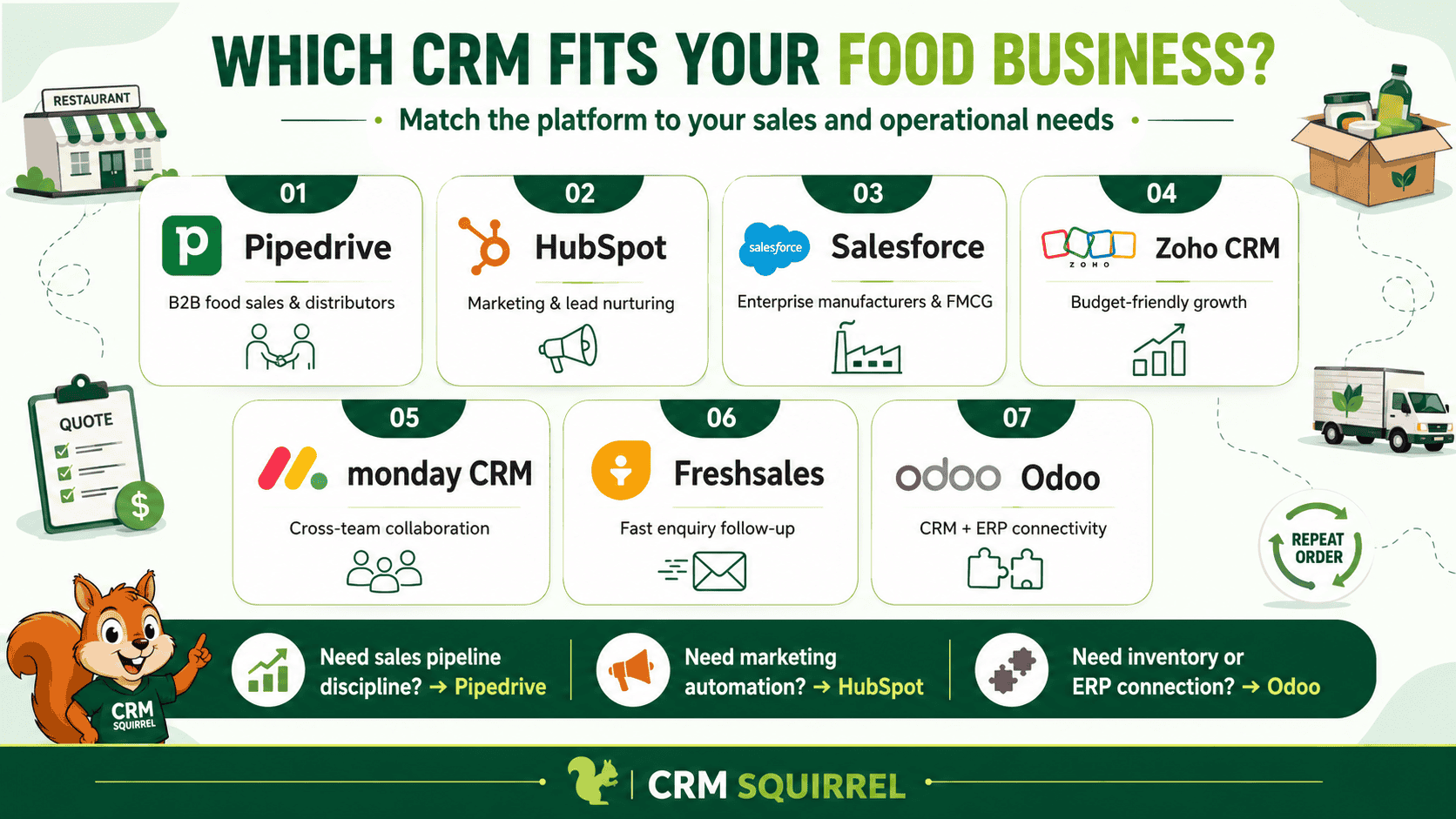
Quick Comparison: Best CRM for Food Industry
The best platform depends on how your business sells and what systems need to connect to your CRM.
| CRM | Best for | Key Strength |
|---|---|---|
| Pipedrive | B2B food suppliers and sales teams | Visual pipeline, follow-ups, automation, simplicity |
| HubSpot | Food brands using inbound marketing | CRM, email marketing, forms, and lifecycle nurturing |
| Salesforce | Enterprise manufacturers and FMCG brands | Deep customization, scalability, complex integrations |
| Zoho CRM | Budget-conscious growing businesses | Flexible customization and broad Zoho ecosystem |
| monday CRM | Collaborative account workflows | Cross-team visibility and customizable boards |
| Freshsales | Fast lead follow-up | Communication tracking and lead management |
| Odoo CRM | CRM connected to ERP or inventory | Sales, inventory, accounting, and operations ecosystem |
How a CRM Increases ROI in the Food Industry
A CRM does not increase ROI simply because it stores contacts. It increases ROI when it helps your team take better actions with customer information.
The most common ROI drivers are improved conversion rates, stronger retention, larger average order value, less manual administration, and fewer missed opportunities.
Improve Lead Response Time
Food buyers often contact several suppliers at once. A CRM helps assign leads quickly and reminds sales reps to respond, reducing the chance that a competitor reaches the prospect first.
For example, a distributor can automatically create a call task when a restaurant submits a wholesale enquiry. The assigned salesperson sees the task immediately instead of discovering the enquiry days later in a shared inbox.
Increase Repeat Orders
Existing customers are usually easier and less expensive to sell to than completely new prospects. A CRM can identify buyers who have not ordered recently and trigger account-manager follow-ups.
Create custom fields for:
- Last order date
- Typical order frequency
- Preferred product categories
- Account value
- Renewal or pricing review date
- Customer satisfaction status
These fields help your team create a proactive reorder and retention process.
Improve Cross-Selling Opportunities
Food businesses often have several products that customers do not know about. CRM segmentation helps sales teams identify relevant cross-selling opportunities based on buyer type, current products, location, or order volume.
For example, a supplier selling frozen bakery products to cafes may identify accounts buying pastries but not purchasing breakfast items, desserts, or seasonal products.
Reduce Administrative Work
When sales reps use spreadsheets, inboxes, and notebooks to manage opportunities, managers cannot easily see what is happening. A CRM centralizes sales activity and automates repetitive work.
Automations can create follow-up tasks, assign leads, send internal notifications, update fields, and remind teams about stale deals. This gives salespeople more time for customer conversations.
Real-World Example: CRM Workflow for a Food Distributor
Consider a regional food distributor that supplies restaurants, hotels, cafes, and independent retailers. The business receives enquiries through referrals, phone calls, its website, trade events, and visiting sales representatives.
Without a CRM, salespeople may keep buyer details in separate spreadsheets and rely on memory for follow-ups. This creates inconsistent service and makes it difficult for management to understand the pipeline.
A practical CRM workflow could look like this:
- A new restaurant enquiry enters the CRM.
- The sales rep records buyer type, location, cuisine category, product interest, estimated order volume, and preferred delivery schedule.
- The deal moves to “Qualification.”
- A task is created to arrange a product sample or sales meeting.
- Once the quote is sent, the CRM creates a follow-up activity for three days later.
- When the customer places a first order, the deal moves to “Won.”
- The account is assigned a reorder review date based on typical order frequency.
- If no activity or order occurs within the planned period, the account manager receives a reminder.
This is a practical use of CRM: fewer forgotten opportunities, more consistent sales follow-up, and a clearer path to repeat revenue.
CRM Custom Fields Every Food Business Should Consider
Custom fields make a CRM more useful because they capture the details your team needs to sell, serve, and retain customers.
A food business should consider fields such as:
- Customer type: Restaurant, retailer, distributor, hotel, caterer, consumer.
- Product category interest.
- Territory or delivery zone.
- Estimated monthly order value.
- Order frequency.
- Preferred delivery day.
- Dietary or certification requirements.
- Buyer role.
- Existing supplier.
- Payment terms.
- Contract or price-review date.
- Sample sent status.
- Lead source.
- Current product range purchased.
- Account priority.
For Pipedrive users, learn more about using custom fields to improve sales and CRM efficiency and structure your pipeline around the information your sales team actually needs.
How to Choose the Right CRM for Your Food Business
The right CRM is not necessarily the one with the most features. It is the one your team will use consistently and that fits the way you sell.
Before choosing a CRM, answer these questions:
- Do you sell mostly B2B, B2C, wholesale, retail, or through distributors?
- Do you need only sales management, or also marketing, service, inventory, and ERP tools?
- How many users will access the CRM?
- Which customer details must your team capture?
- Do you need mobile access for field sales representatives?
- Which tools must integrate with the CRM?
- How complex is your approval, quotation, and onboarding process?
- Who will own the CRM internally after implementation?
For many small and mid-sized food businesses, Pipedrive provides the right balance of ease of use, sales automation, custom fields, reporting, and integrations. For larger businesses with complex ERP, retailer, or trade-promotion needs, Salesforce or Odoo may be a stronger long-term fit.
Get Expert Help Setting Up Your Food Industry CRM
The CRM software is only part of the solution. Your ROI depends on how well the system matches your pipeline, customer segments, sales process, team habits, and connected tools.
CRM Squirrel helps businesses create practical Pipedrive systems with custom pipelines, sales automations, reporting, integrations, data migration, and team training. Explore our Pipedrive setup services if you want a CRM that supports your real sales workflow rather than adding more admin work.
You can also start with CRM Squirrel’s exclusive 45-day Pipedrive free trial and get the foundation for a more organized, proactive, and profitable food sales process.
Frequently Asked Questions
This FAQ section answers common questions food businesses ask when choosing CRM software.
What is the best CRM for food distributors?
Pipedrive is one of the best options for small and mid-sized food distributors because it provides a simple visual sales pipeline, activity management, custom fields, automation, and reporting. Larger distributors that need deeper ERP integration may also consider Odoo or Salesforce.
Can a CRM manage food inventory?
Most CRMs are not full inventory-management systems. They can track customer relationships, sales opportunities, product interest, quotes, and account activity. For stock levels, batch tracking, expiry dates, production, and warehouse processes, connect the CRM to an ERP, POS, accounting, or inventory platform.
How does CRM help restaurants and catering companies?
A CRM helps restaurants and catering companies manage corporate enquiries, event bookings, repeat customers, menu proposals, follow-up tasks, and customer preferences. It can also improve response times and reduce missed booking opportunities.
Is Pipedrive good for food businesses?
Yes. Pipedrive is a strong choice for food businesses that sell through B2B relationships, wholesale accounts, restaurants, retailers, or distributors. Its customizable pipelines and activity reminders are particularly useful for managing samples, quotes, negotiations, first orders, and repeat-order opportunities.
What CRM data should food businesses track?
Track customer type, location, product interest, expected order volume, order frequency, buyer role, delivery preferences, lead source, account value, existing supplier, and next follow-up date. The exact fields should reflect your sales and delivery process.
How long does CRM implementation take?
A simple CRM setup can take days or a few weeks, depending on data quality, pipeline complexity, integrations, and team training needs. More complex implementations involving data migration, ERP integrations, and several departments can take longer.


