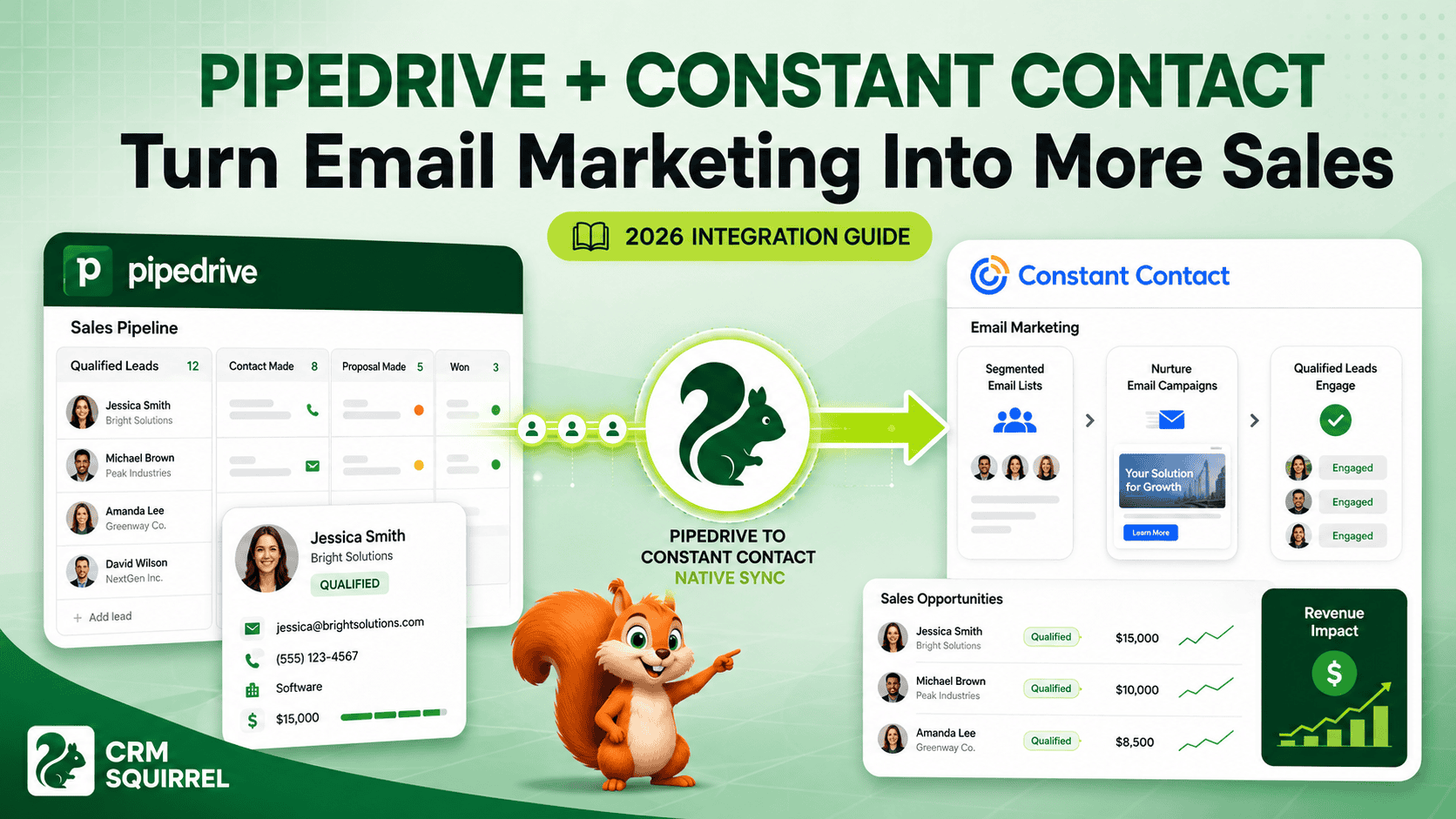
Pipedrive and Constant Contact can help businesses connect two activities that are often managed separately: sales follow-up and email marketing. Pipedrive gives sales teams a structured place to manage leads, contacts, deals, activities and pipeline stages. Constant Contact helps marketing teams send campaigns, build segments and keep prospects engaged over time.
When these platforms are connected correctly, your sales team does not need to manually export lists every week, and your marketing team does not have to work from outdated contact data. Qualified leads can move from Pipedrive into the appropriate Constant Contact audience, receive relevant email campaigns and return to the sales pipeline with better context.
The objective is not to send more emails. The objective is to send the right message to the right prospect at the right stage of the buying journey.
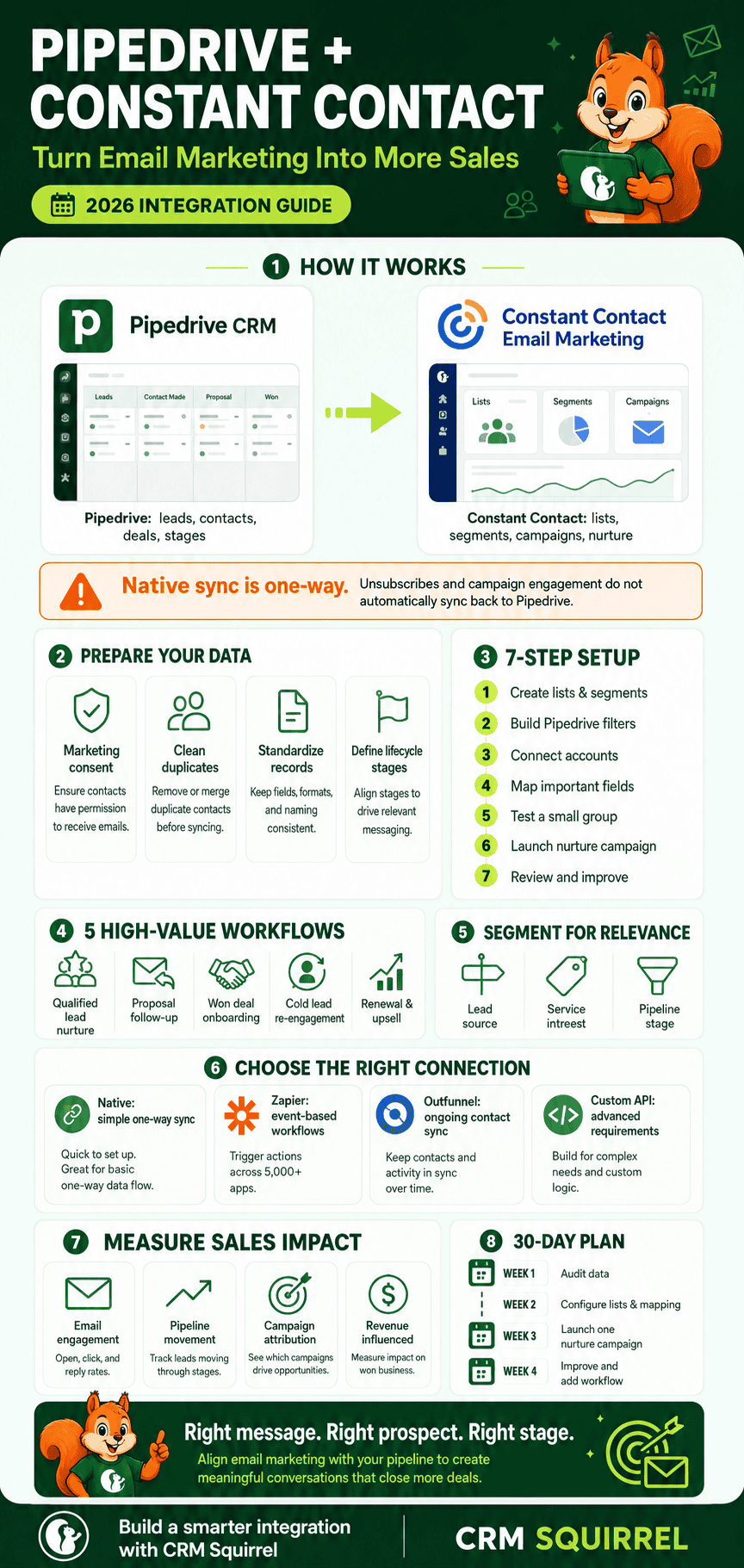
Constant Contact’s current Pipedrive connection can automatically sync contact and lead data from Pipedrive into Constant Contact. However, it is important to understand that the direct sync is one-way: data flows from Pipedrive to Constant Contact, while unsubscribe status and campaign engagement do not automatically flow back into Pipedrive. Constant Contact’s official integration guidance confirms this limitation.
Want to test Pipedrive with your own sales process? CRM Squirrel offers an exclusive 45-day Pipedrive free trial with expert guidance, a discovery call and complimentary automation support.
What Is Pipedrive Constant Contact Integration?
Pipedrive Constant Contact integration connects your sales CRM with your email marketing platform. It allows sales and marketing teams to use more consistent contact data, improve audience segmentation and reduce manual list management.
Pipedrive remains the main source of truth for leads, deals, people, organizations, sales activities and pipeline stages. Constant Contact becomes the platform for newsletters, nurture campaigns, promotional emails, event communication and longer-term customer engagement.
The direct Constant Contact connection can sync Pipedrive contacts and lead data into Constant Contact through Contacts Lists, Leads Lists or Campaign Lists. This makes it easier to build targeted audiences without manually downloading and uploading CSV files.
A properly configured integration can help your business:
- Add qualified Pipedrive contacts to the right email list
- Segment prospects by industry, location, service interest or lifecycle stage
- Nurture leads that are not ready to buy yet
- Send onboarding emails when deals are won
- Re-engage cold leads with relevant content
- Keep marketing lists more current
- Reduce manual data entry
- Give salespeople more time to focus on active opportunities
For a broader introduction to connecting Pipedrive with other business tools, read our Pipedrive API integration guide.
Why Integrating Pipedrive With Constant Contact Can Increase Sales
Sales rarely happen after one email or one phone call. Prospects may need educational content, case studies, reminders, product updates or proof that your business understands their problem before they are ready to speak with a salesperson.
Pipedrive helps the sales team identify where each prospect sits in the pipeline. Constant Contact helps marketing deliver relevant communication until that prospect is ready for the next conversation.
Keep Sales and Marketing Working From Better Data
When sales and marketing use separate, unconnected lists, data becomes outdated quickly. A marketing team may email leads who have already become customers, while salespeople may follow up with contacts who have unsubscribed or are no longer relevant.
Connecting Pipedrive with Constant Contact reduces this gap by using CRM information to control who enters email marketing audiences. For example, your team can use Pipedrive fields to identify prospects by:
- Lead source
- Service interest
- Industry
- Location
- Company size
- Deal value
- Pipeline stage
- Sales representative
- Customer status
- Event registration
- Product or service category
This creates more relevant campaigns and helps the team avoid treating every contact the same way.
Nurture Leads That Are Not Ready to Buy
Many leads are interested but not ready to make a decision immediately. If your sales team only follows up with people who are ready now, it may lose future revenue opportunities.
A Constant Contact nurture sequence can keep your brand visible while Pipedrive tracks the commercial relationship. The prospect can receive educational emails, testimonials, service guides, event invitations and useful updates until they are ready to re-enter an active sales conversation.
This approach is particularly useful for businesses with longer sales cycles, including agencies, consultants, B2B service providers, property businesses, software companies and professional service firms.
Improve Follow-Up Consistency
Manual follow-up depends on people remembering what to do next. Even good salespeople can miss a task when they are managing many opportunities at once.
Pipedrive provides activity tracking and sales automation, while Constant Contact can deliver scheduled email communication. Together, they create a more consistent customer journey.
For example, a prospect who downloads a guide may be added to a nurture list. If they later book a call or become qualified, Pipedrive can assign a sales activity to the appropriate representative. Marketing continues to support the conversation without replacing the salesperson’s personal follow-up.
Build Better Segments for Higher-Relevance Campaigns
Email relevance matters more than email volume. Sending the same campaign to every contact can reduce engagement and create unnecessary unsubscribe requests.
Constant Contact supports contact lists, tags, custom fields and segments. Its official segmentation guidance explains that segmentation helps marketers target the right contacts with more relevant messaging.
Pipedrive Custom Fields can give Constant Contact more useful information for segmentation. Instead of one broad “Newsletter” list, your business can create audiences such as:
- New leads from Google Ads
- Website enquiry leads
- Leads interested in CRM consulting
- Leads interested in Pipedrive setup
- Agency owners
- Existing customers
- Past customers
- Leads waiting for a proposal
- Contacts interested in an upcoming webinar
- Customers due for renewal
How the Native Pipedrive Constant Contact Connection Works
The native connection is a useful starting point for businesses that mainly need Pipedrive contacts and leads to enter Constant Contact audiences. It is designed to reduce manual exports and keep email marketing lists aligned with CRM data.
According to Constant Contact, the integration can sync Pipedrive contacts and lead data using Contacts Lists, Leads Lists or Campaign Lists. The important limitation is that the sync is one-way from Pipedrive to Constant Contact.
What Data Can Be Sent to Constant Contact?
The information available depends on your Pipedrive records and integration configuration. Before connecting the systems, you should decide which data is necessary for marketing segmentation and personalization.
Common information to sync includes:
- First name
- Last name
- Email address
- Telephone number
- Company name
- Job title
- Location
- Lead source
- Service interest
- Industry
- Customer type
- Sales stage
- Account manager
- Custom Fields
- Marketing consent status
Do not sync every internal CRM field simply because it exists. Only send information that has a clear marketing purpose and is appropriate to use in email campaigns.
What Does Not Automatically Sync Back to Pipedrive?
This is the most important setup consideration. Constant Contact confirms that unsubscribe information and contact activity are not automatically sent back to Pipedrive through the direct connection.
That means a contact may unsubscribe in Constant Contact while the Pipedrive record still appears available for marketing communication unless your team creates an additional process.
To protect your data quality and compliance, you should create a clear rule:
- Constant Contact should remain the source of truth for email subscription status.
- Pipedrive should contain a visible marketing consent or “Do Not Email” field.
- Unsubscribe updates should be reviewed or automated back into Pipedrive through a third-party connector or custom API workflow.
- Sales representatives should check contact preferences before manually adding someone to an email campaign.
Prepare Your Pipedrive Data Before Connecting Constant Contact
The quality of your integration depends on the quality of the CRM data you send into it. Connecting unstructured or duplicated data simply creates a larger marketing list with the same existing problems.
Before activation, review your Pipedrive people, organizations, leads and deal fields.
Create a Marketing Consent Field
Every business should clearly separate people who are permitted to receive marketing emails from those who are only providing contact details for a specific sales conversation.
Create a Pipedrive field such as:
- Marketing Consent
- Email Marketing Permission
- Newsletter Opt-In
- Do Not Email
- Communication Preference
Your integration rules should use this field as a filter. Only contacts with the appropriate permission should be added to Constant Contact marketing lists.
Constant Contact also states that users are not permitted to upload or use purchased, traded, shared or borrowed lists. Its contact list guidance is a useful reference when planning a permission-based email strategy.
Standardize Contact and Company Records
Duplicate records can lead to duplicate emails, confusing sales histories and inaccurate campaign reporting. Before launching the integration, clean common data issues in Pipedrive.
Your data-cleaning checklist should include:
- Remove duplicate people records
- Confirm primary email addresses
- Standardize company names
- Check telephone number formatting
- Remove inactive or irrelevant contacts
- Confirm lead ownership
- Standardize lead source values
- Confirm marketing consent
- Review incomplete Custom Fields
- Archive obsolete deals
This work may feel administrative, but it prevents poor targeting and protects the customer experience.
Define Your Lifecycle Stages
A lead should not receive the same message after becoming a customer. Defining lifecycle stages helps your automation send communication that matches the contact’s relationship with the business.
Useful lifecycle values may include:
- New Lead
- Marketing Qualified Lead
- Sales Qualified Lead
- Discovery Call Booked
- Proposal Sent
- Negotiation
- Customer
- Onboarding
- Active Client
- Renewal Due
- Former Customer
- Re-engagement Candidate
These stages can be managed through Pipedrive pipelines, labels or Custom Fields. The important point is that they are clearly defined and used consistently.
How to Set Up Pipedrive Constant Contact Integration
The setup process should begin with a small test group rather than your entire database. Testing allows your team to confirm field mapping, lists, consent rules and duplicate handling before active campaigns begin.
The exact screens may change over time, but the setup approach below provides a safe implementation process.
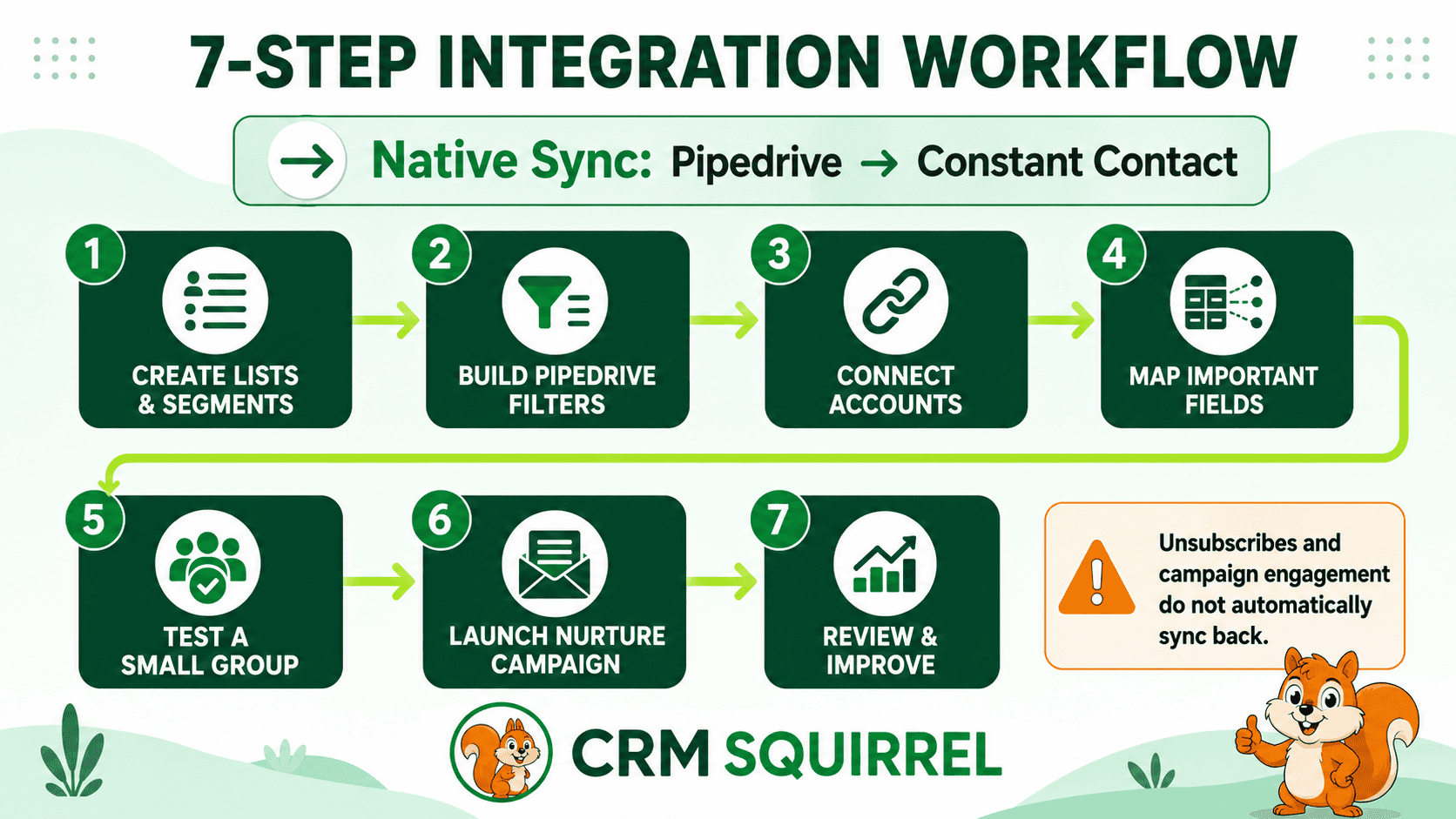
Step 1: Create Your Constant Contact Lists and Segments
Start by deciding which audiences you need. Avoid building one large list that mixes leads, customers and inactive contacts together.
Create lists based on clear business purposes, such as:
- Newsletter subscribers
- New leads
- CRM consulting prospects
- Pipedrive setup prospects
- Existing customers
- Webinar registrants
- Event attendees
- Renewal contacts
- Re-engagement contacts
Use tags and segments when you need more detailed targeting. Constant Contact’s tags overview explains that tags can categorize contacts without requiring separate lists for every variation.
Step 2: Build Matching Filters in Pipedrive
Next, create Pipedrive filters that identify exactly who should enter each Constant Contact audience. Filters reduce the risk of syncing the wrong contacts.
For example, a filter for a CRM consulting nurture list might include:
- Marketing Consent equals Yes
- Service Interest equals Pipedrive Consulting
- Deal Status is Open or Lead Status is Active
- Person Email is not empty
- Do Not Email is not Yes
A customer newsletter filter may include:
- Customer Status equals Active
- Marketing Consent equals Yes
- Email address is not empty
Clear filters make automation more reliable and easier to audit later.
Step 3: Connect the Two Accounts
Connect your Pipedrive account from Constant Contact’s Pipedrive integration area and authorize access. Use an account with the appropriate permissions, and ensure the person managing the setup understands both the CRM and email marketing process.
During setup, confirm which Pipedrive source you want to use:
- Contacts List
- Leads List
- Campaign List
The best source depends on your process. A business with a clear lead qualification process may begin with qualified leads. A business focused on customer communication may sync selected contact lists instead.
Step 4: Map the Important Fields
Field mapping ensures that the information from Pipedrive appears in the correct Constant Contact contact fields. Accurate mapping supports personalization, segmentation and reporting.
Map the essentials first:
- First name
- Last name
- Email address
- Company name
- Job title
- Telephone number
- Location
- Lead source
- Service interest
- Lifecycle stage
- Marketing consent
Use custom fields only when they support a specific marketing decision. Too many fields create complexity without improving campaigns.
Step 5: Test With a Small Group
Before syncing your complete database, use a small group of internal contacts or approved test records. Confirm that the right people are added to the right Constant Contact list and that field values appear correctly.
Check the following during testing:
- Are names and email addresses correct?
- Are duplicate contacts created?
- Are contacts added to the correct list?
- Are Custom Fields mapped correctly?
- Are contacts without consent excluded?
- Does the test list receive the correct email personalization?
- Are sales representatives aware of the new workflow?
Only expand the sync after the results are correct.
Step 6: Launch Your First Nurture Campaign
Your first campaign should have one clear goal. Do not start with a complicated sequence containing many branching paths.
A simple first campaign can include:
- A welcome email explaining what the subscriber will receive.
- A useful educational email related to their interest.
- A case study, client story or practical guide.
- A soft call to action to book a discovery call.
- A final reminder with a relevant resource or consultation offer.
This provides value before asking for a sales conversation.
Step 7: Review Results and Improve the Workflow
Integration setup is not a one-time task. Review list growth, email performance, pipeline movement and lead quality regularly.
Constant Contact provides email campaign reporting, including campaign interactions such as opens, clicks and forwards. Its campaign stats API guidance explains the available campaign-level performance data.
Use this information to improve future campaigns, but avoid judging success through opens alone. Privacy features can make open data less reliable. Clicks, replies, meeting bookings, qualified opportunities and won revenue are stronger business indicators.
High-Converting Pipedrive Constant Contact Automation Workflows
The best automation workflows support a defined customer journey. Each workflow should have a clear trigger, audience, message and handoff back to sales.
Below are practical examples that can be adapted to your business.
New Qualified Lead Nurture Workflow
This workflow is designed for leads that have shown interest but are not yet ready for a sales call. The goal is to educate them and create a reason to engage.
When a lead is marked as qualified in Pipedrive and has marketing consent, add the person to a Constant Contact nurture list. Send a short email sequence based on the service or product they are interested in.
For example, a Pipedrive consulting prospect could receive:
- A welcome email
- A guide explaining common CRM problems
- A checklist for improving pipeline management
- A short case study
- A call-to-action to book a Pipedrive consultation
The sales representative should also receive a Pipedrive activity to review the lead after the sequence has had time to run.
Proposal Follow-Up Workflow
Many businesses lose opportunities after sending a proposal because there is no consistent follow-up process. This workflow helps maintain momentum without sending aggressive daily emails.
When a deal moves to “Proposal Sent” in Pipedrive, create a follow-up activity for the deal owner. If the prospect has opted into marketing communication, add them to a relevant short-term value sequence.
The sequence might include:
- A proposal confirmation email
- A frequently asked questions email
- A relevant case study
- A reminder about the expected decision date
- A booking link for questions
The salesperson remains responsible for direct communication. Constant Contact supports the conversation by providing useful information at the right time.
Won Deal Onboarding Workflow
The customer journey should not stop when a deal is marked as won. A strong onboarding sequence improves confidence, reduces confusion and supports retention.
When a Pipedrive deal is marked as won, add the customer to a Constant Contact onboarding list. The campaign can introduce next steps, key contacts, support resources, timelines and useful training materials.
An onboarding sequence may include:
- Welcome and thank-you email
- What happens next
- Introduction to the account manager
- Required documents or information
- Product setup or service delivery guide
- Training invitation
- Request for feedback after successful completion
This creates a more professional handover between sales and delivery.
Re-Engagement Workflow for Cold Leads
Cold leads should not simply disappear from the CRM. Some prospects were interested but had poor timing, budget limitations or competing priorities.
Create a Pipedrive filter for contacts who have not progressed after a defined period but still have valid consent. Add them to a re-engagement list in Constant Contact.
A re-engagement campaign can offer:
- A new guide or checklist
- An industry update
- A webinar invitation
- A new product or service update
- A case study
- A simple “Are you still interested?” email
If the contact clicks a high-intent link or submits a form, create a Pipedrive activity for the deal owner to follow up personally.
Renewal and Upsell Workflow
Existing customers are often the best source of renewal and expansion opportunities. Pipedrive can identify renewal dates, product ownership and account managers, while Constant Contact can deliver timely educational communication.
Create a workflow for customers approaching renewal or eligible for an additional service. The campaign should focus on value, results and relevant next steps rather than a generic sales message.
For example, an existing CRM consulting customer may receive content about:
- Advanced automation
- Reporting improvements
- Lead routing
- Sales dashboard setup
- API integrations
- Team training
- New pipeline design
This approach can create opportunities without relying only on cold outreach.
How to Use Segmentation to Improve Email Conversion
Segmentation is one of the biggest sales benefits of Pipedrive Constant Contact integration. It allows businesses to deliver more relevant content based on CRM data rather than sending every contact the same email.
The best segments are based on information that changes the message a person should receive.
Segment by Lead Source
Different lead sources often indicate different levels of awareness and intent. A referral lead may need a different message from someone who downloaded a free guide.
Useful lead-source segments can include:
- Google Ads leads
- Organic search leads
- Referral leads
- Webinar registrants
- Facebook leads
- LinkedIn leads
- Event leads
- Website enquiry leads
- Existing customer referrals
This helps you compare which channels create engaged contacts and qualified opportunities.
Segment by Service Interest
If your business offers several services, one generic email list may reduce relevance. Use Pipedrive Custom Fields to identify the service or product a lead is interested in.
For CRM Squirrel, useful interest-based segments may include:
- Pipedrive setup
- Pipedrive automation
- Pipedrive integrations
- Pipedrive consulting
- CRM audit
- Sales reporting
- White-label Pipedrive services
A prospect interested in integrations should receive different content from someone looking for initial CRM setup.
Segment by Pipeline Stage
Pipeline stage can help your marketing reflect the current sales context. A new enquiry should not receive the same email as someone reviewing a proposal.
Examples include:
- New lead education
- Qualified lead nurture
- Proposal support
- Decision-stage case studies
- Customer onboarding
- Renewal communication
- Former customer re-engagement
This alignment helps marketing support sales instead of sending irrelevant messages.
Native Integration vs Zapier vs Outfunnel vs Custom API
The best integration method depends on your data volume, complexity and reporting requirements. The direct Constant Contact connection is usually suitable when you mainly need one-way contact syncing from Pipedrive into Constant Contact.
Use the Native Constant Contact Connection for Simple One-Way Sync
The direct connection is best when your main requirement is to transfer approved contacts and leads from Pipedrive into Constant Contact lists.
This option is suitable when:
- Pipedrive is your main contact source
- You mainly need email list synchronization
- Your segmentation is relatively simple
- You can manage unsubscribe updates through a separate process
- You do not need complex two-way workflows
- You want to reduce CSV imports
Remember that Constant Contact states unsubscribe and contact activity data are not returned to Pipedrive through this sync.
Use Zapier for Event-Based Workflows
Zapier’s Pipedrive and Constant Contact connection is useful when you need event-based workflows beyond a straightforward list sync.
Zapier can be helpful for actions such as:
- Create or update a Pipedrive person when a Constant Contact contact is added
- Create a Pipedrive activity after a campaign action
- Update a deal based on a form submission
- Send selected Pipedrive contacts to specific Constant Contact lists
- Add internal notifications for high-intent actions
- Update a “Do Not Email” field after an unsubscribe event, where supported
Zapier is flexible, but task usage and workflow complexity can increase as your contact volume grows. Constant Contact notes that Zapier integrations may involve additional cost.
Use Outfunnel for Ongoing Contact Synchronization
Outfunnel can be a good option when you need field mapping, deduplication and ongoing contact synchronization from Pipedrive to Constant Contact.
Its current Pipedrive-to-Constant Contact setup guide describes one-way contact sync, custom field mapping and email-based deduplication.
Outfunnel may suit teams that need:
- Pipedrive People filters
- Continuous contact updates
- Custom field mapping
- Duplicate prevention
- A no-code setup
- More control than a basic list import
Review your exact requirements before selecting any third-party connector because features, costs and sync direction may change.
Use a Custom API Integration for Advanced Requirements
A custom API integration is appropriate when your business requires complex logic, custom dashboards, detailed attribution or a specific data model.
Pipedrive provides APIs and webhooks for leads, people, organizations, deals and activities. Constant Contact provides APIs for contacts, lists, tags, campaigns, segments and campaign reporting.
A custom integration may be suitable when you need to:
- Send only contacts meeting complex rules
- Update Pipedrive based on campaign click actions
- Create custom lead scores
- Sync campaign attribution into deal records
- Build revenue reporting by email campaign
- Handle special consent rules
- Connect website forms, Pipedrive and Constant Contact together
- Create multi-step workflows across several platforms
Custom integrations require careful planning, secure authentication, error logging and ongoing maintenance. CRM Squirrel can help you plan and implement these workflows through Pipedrive API integration services.
How to Measure Sales Results From the Integration
The purpose of the integration is to improve business outcomes, not only grow an email list. Your reporting should connect campaign activity with sales pipeline movement.
Measure performance at both marketing and sales levels.
Track Marketing Engagement
Constant Contact campaign reporting can help you understand how audiences interact with your email content. Review trends over time rather than reacting to one campaign in isolation.
Track:
- Deliverability
- Click-through rate
- Link clicks by topic
- Unsubscribe trends
- List growth
- Segment performance
- Form conversions
- Webinar registrations
- Replies and direct enquiries
Use these metrics to improve messaging, timing and audience relevance.
Track Sales Pipeline Impact
Pipedrive should show what happens after leads engage with marketing. Add campaign-related fields or labels so the team can connect marketing activity with commercial outcomes.
Track:
- New qualified leads
- Meetings booked
- Deals created
- Proposal requests
- Pipeline progression
- Deal value
- Win rate
- Sales cycle length
- Won revenue
- Renewal revenue
- Upsell opportunities
The strongest question to ask is not, “How many opens did this email receive?” It is, “Did this campaign create qualified conversations and revenue?”
Use Campaign Attribution Fields
Create a few simple fields in Pipedrive to make reporting easier. Salespeople should not be required to enter excessive data, but a small amount of structured attribution can produce valuable insights.
Useful fields include:
- First Marketing Source
- Latest Campaign
- Campaign Topic
- Email Engagement Level
- Marketing Qualified Date
- Re-engagement Campaign
- Webinar Attended
- Last Clicked Resource
This helps identify which campaigns are contributing to pipeline growth.
Common Pipedrive Constant Contact Integration Mistakes
Most integration failures are caused by unclear rules rather than technical problems. A successful setup needs defined ownership, consent management and regular review.
Avoid the following common mistakes.
Syncing Every Contact Automatically
Not every person in your CRM should receive marketing emails. Some contacts may be suppliers, job applicants, inactive records, personal contacts or people who did not provide marketing permission.
Use Pipedrive filters and consent fields to control who is synced. Start with a narrow, approved audience and expand only when your process is working correctly.
Treating Pipedrive and Constant Contact as Fully Two-Way
The direct integration does not automatically return unsubscribe status or campaign activity to Pipedrive. If your team assumes a full two-way sync, salespeople may use outdated communication preferences.
Create a documented process for unsubscribe handling and consider Zapier or a custom workflow if you need this information reflected in Pipedrive.
Sending the Same Message to Every Contact
Broad, generic campaigns usually create weak engagement. Use Pipedrive fields, lifecycle stages and service-interest data to create relevant audiences.
A new lead should receive education. A proposal-stage lead should receive proof and answers. A customer should receive onboarding, retention or expansion content.
Automating Without Testing
Automation should always be tested with a small group before going live. A wrong filter or field mapping can add hundreds of contacts to the wrong campaign.
Test the workflow, review the contacts, inspect the email content and confirm the expected list membership before using the automation at scale.
Ignoring Sales Team Input
The sales team understands the objections, questions and timing issues prospects face. Marketing automation works best when sales and marketing agree on the meaning of pipeline stages, lead quality and follow-up responsibility.
Review campaign results with sales representatives regularly. Their feedback can improve segmentation, email topics and calls to action.
Build a 30-Day Pipedrive Constant Contact Implementation Plan
A phased rollout helps your business avoid rushed automation and protects the quality of your CRM data. Begin with the simplest high-value workflow and improve it after reviewing results.
Week 1: Audit Data and Define Goals
Use the first week to review Pipedrive data, clean duplicates and define what success means. Choose one specific business outcome, such as increasing consultation bookings or improving follow-up for inactive leads.
Confirm your marketing consent process, create the required Pipedrive fields and identify the first audience to sync.
Week 2: Configure Lists, Filters and Field Mapping
During the second week, create Constant Contact lists, tags and segments. Build matching Pipedrive filters and map the important data fields.
Use a test group to confirm that contacts enter the correct list and that personalization fields work correctly.
Week 3: Launch One Nurture Campaign
Launch one simple campaign for one audience. Focus on useful content and a clear call to action instead of creating a large, complex automation sequence.
Review the first results, including clicks, replies, booked calls and sales-team feedback.
Week 4: Improve and Add a Second Workflow
Use the fourth week to improve the first campaign based on the results. Then add a second workflow, such as proposal follow-up, customer onboarding or re-engagement.
Continue documenting rules so that the integration remains understandable as your team and database grow.
Ready to Turn Email Marketing Into More Sales Conversations?
Pipedrive Constant Contact integration can improve sales when it is built around clean data, consent-based lists, clear segmentation and a defined handoff between marketing and sales.
CRM Squirrel can help you design the full workflow, including Pipedrive pipeline setup, Custom Fields, lead routing, automation, data cleanup, Constant Contact connection, campaign segmentation and reporting.
Start by trying Pipedrive with CRM Squirrel’s exclusive 45-day Pipedrive free trial. You can also explore our Pipedrive service packages for setup, automation, integration and ongoing CRM support.
Frequently Asked Questions About Pipedrive Constant Contact Integration
The following questions address common setup, automation and sales process concerns. They can also be used for FAQ schema on the published article.
Does Constant Contact Integrate With Pipedrive?
Yes. Constant Contact provides a Pipedrive connection that can automatically sync Pipedrive contact and lead data into Constant Contact. The available import options include Contacts Lists, Leads Lists and Campaign Lists.
Is Pipedrive Constant Contact Integration Two-Way?
No. Constant Contact states that the direct sync is one-way from Pipedrive to Constant Contact. Unsubscribes and contact activity are not automatically sent back to Pipedrive.
Can I Sync Pipedrive Leads to Constant Contact?
Yes. You can sync Pipedrive lead and contact data into Constant Contact, then use lists, tags and segments to send relevant campaigns.
Can I Add Pipedrive Contacts to Different Constant Contact Lists?
Yes. Use Pipedrive filters, Custom Fields and lifecycle stages to control which contacts enter different Constant Contact lists. For example, you can create separate lists for new leads, customers, webinar registrants and renewal opportunities.
How Can I Track Email Marketing Revenue in Pipedrive?
Create Pipedrive fields for campaign source, latest campaign, engagement level and marketing-qualified date. Then monitor meetings, deals, deal values and won revenue connected to those campaign fields.
Can Zapier Connect Constant Contact and Pipedrive?
Yes. Zapier can connect Constant Contact and Pipedrive through trigger-and-action workflows. It can be useful for event-based automation, internal notifications, contact updates and selected data handoffs.
Should I Sync All Pipedrive Contacts to Constant Contact?
No. Only sync contacts who have the appropriate marketing permission and fit a specific campaign audience. Use consent fields and Pipedrive filters to prevent irrelevant or non-permitted contacts from entering marketing lists.
What Is the Best First Automation to Build?
A qualified lead nurture workflow is often the best first automation. It can welcome new leads, provide useful resources, build trust and encourage prospects to book a sales conversation.
Can CRM Squirrel Set Up Pipedrive Constant Contact Integration?
Yes. CRM Squirrel can help configure your Pipedrive pipeline, clean contact data, create segmentation fields, set up automation, connect Constant Contact and build a reporting process that supports sales growth.


